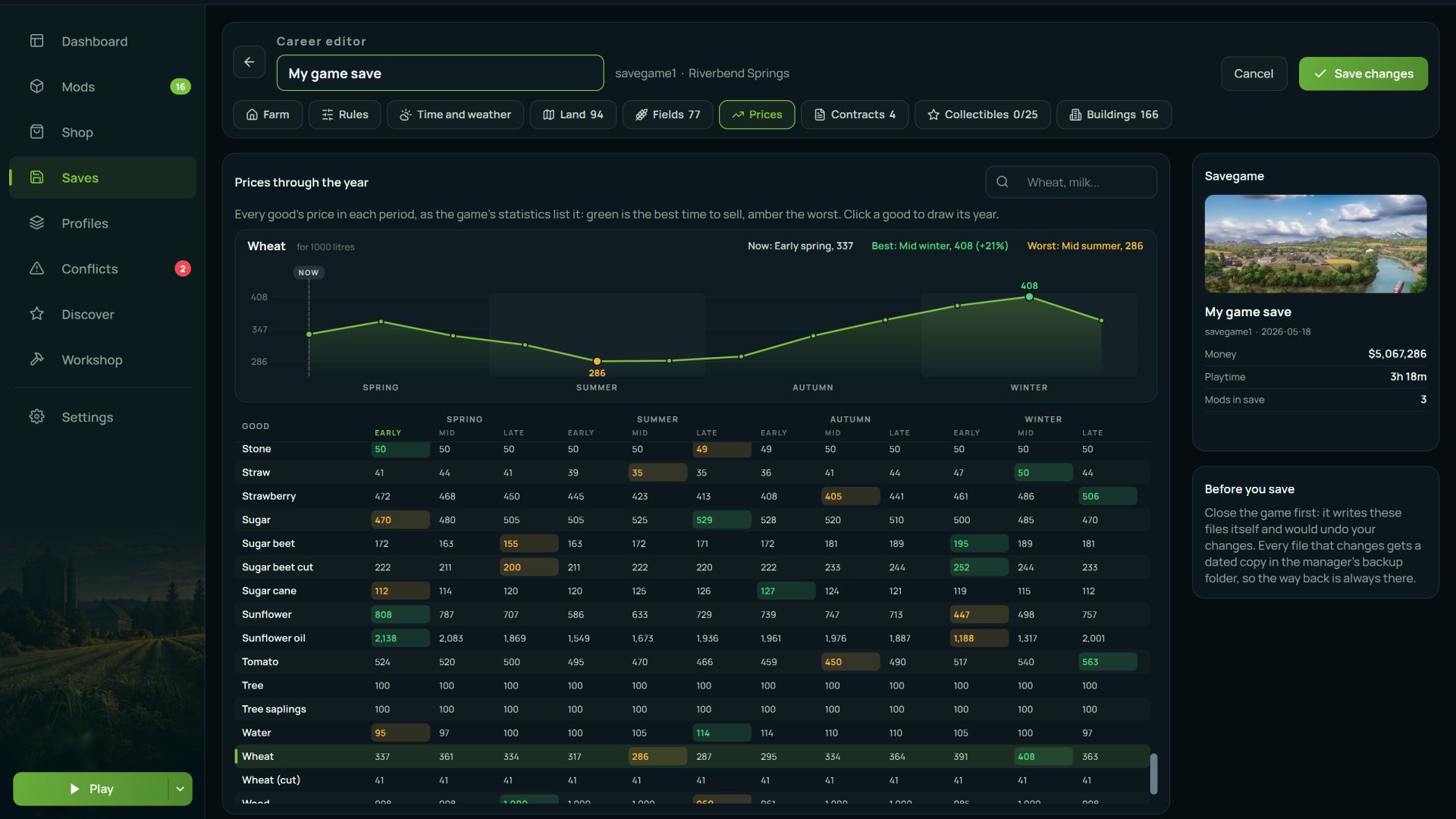
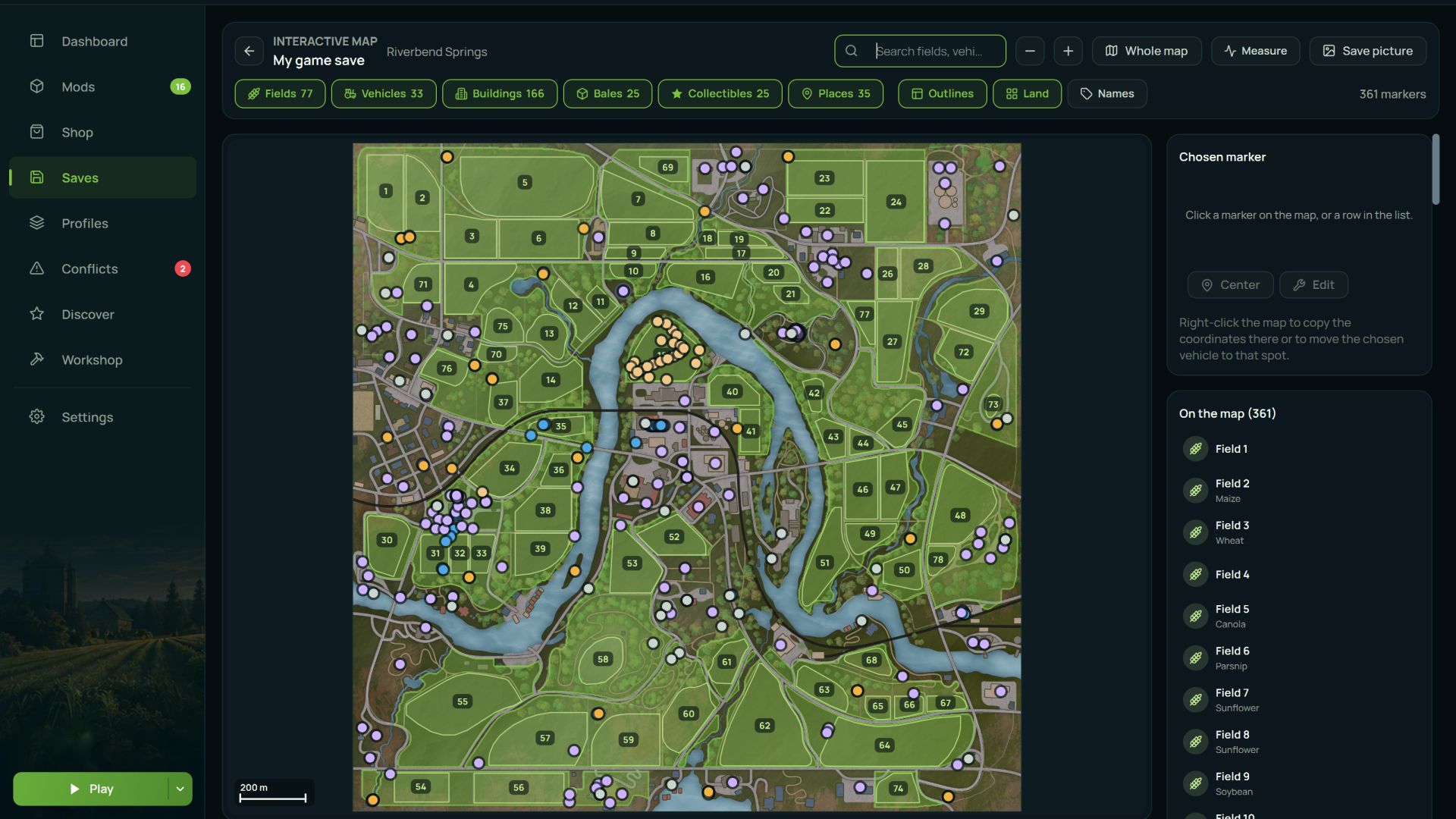

A mod manager for Farming Simulator 25. It installs and removes mods, keeps your mods folder tidy, finds conflicts before they stop the game from loading, reads the game log, edits savegames, and shows you exactly what every mod adds to the in-game shop. Free, no ads, no bundled third-party software.
—————————————————————————————————
Why you would want it
Anyone running more than twenty mods knows the stories. The game stopped loading and there is no telling which mod did it. Two mods added the same fill type and now the shop is a mess. You updated a mod, the old one was better, and the old one is gone. You want to switch half your mods off for one savegame and switch them all back afterwards.
The manager solves this by reading the same files the game reads and telling you what is in them in plain language.
—————————————————————————————————
General features
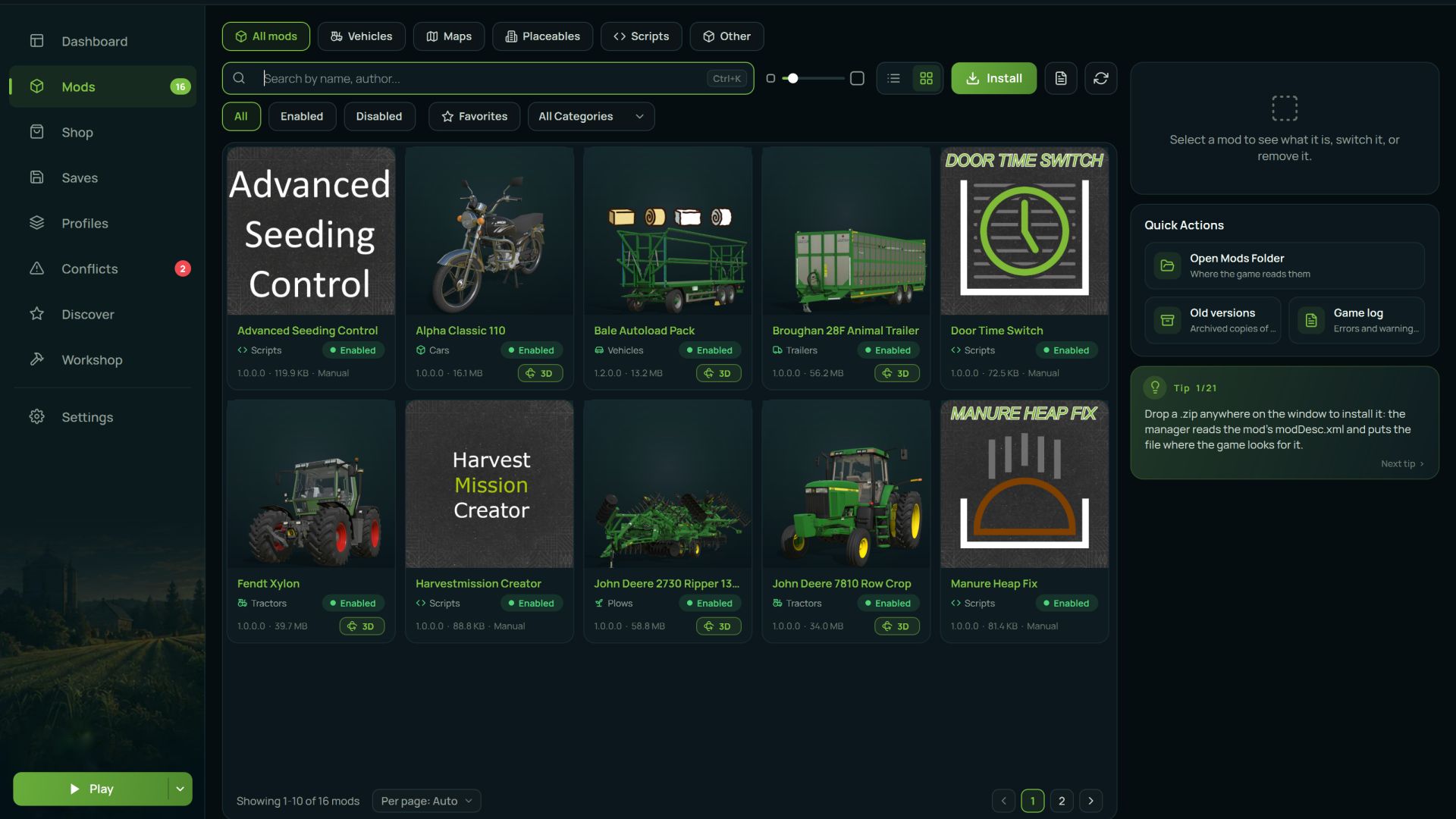
- Installing mods. Drop an archive on the window or pick a file. It handles zip, 7z and rar, and works out where the mod belongs on its own.
- Enable and disable. Disabled mods are not deleted. They move to a separate folder and come back with one click. The game does not see them, you do not lose them.
- Mod profiles. Named sets of mods you can switch between. One set for multiplayer, another for singleplayer, another for a specific map. Switching swaps the contents of the mods folder as a whole.
- Version archive. When you update a mod, the old version is kept rather than overwritten. If the new one turns out worse, rolling back takes two clicks, and the version you are replacing is archived too, so the rollback is itself reversible.
- History. What was installed, enabled, disabled or removed, and when. When the game suddenly breaks, the first question is always "what did I change yesterday", and now there is an answer.
- One-click install from ModsFire. Press the button on the site and the mod arrives in the manager. For now, several authors are supported, but going forward it'll be easy to auto-install almost any mods from this file-sharing service.
- Seven interface languages: English, Russian, Ukrainian, German, French, Spanish and Portuguese.
- Several games in one window. Besides FS25 it supports FS22, FS19, BeamNG.drive, Euro Truck Simulator 2 and American Truck Simulator, each with its own folder and its own settings.
—————————————————————————————————
What it does specifically for FS25
This is where most of the work went. Everything below reads the game's real files rather than guessing.
1) Conflict detection
Finds the things that make mods fight each other, and explains what each one will actually break:
- The same fill type (`fillType`) declared by two different mods
- The same vehicle type (`vehicleType`) registered twice, where the second registration overrides the first and the displaced mod's vehicles fail to load
- Two shop items with the same name, which leaves you two near-identical entries in the store
- Key binding clashes, with the exact list of which mod bound which action to that key
- The same script file loaded by more than one mod
- Duplicates and older copies of the same mod
2) Mod health checks
Separately, it finds mods that are broken on their own:
- An archive inside an archive, which the game cannot unpack
- A missing or corrupt `modDesc.xml`
- Files wrapped in an extra folder, so the game never sees the mod at all
- DescVersion problems, including mods built for a newer game version
- Internal paths too long to extract, which is why vehicles or textures later go missing in game
- Corrupt archives and leftover junk files
3) Log analysis
Reads the game's log.txt and turns it into a readable list: what the error is, which mod caused it, and what to do about it. Repeated errors collapse into a single entry with a counter, so one message repeated two hundred times does not bury everything else.
It recognises missing files and textures, Lua errors with their call stacks, missing translations, uncompressed textures, vehicles that fell through the map, and rejected mod filenames.
4) Shop browser
Shows everything your installed mods add to the in-game store, in one list. Search, filters by brand, category and type, eight sort orders and a tile view. Each item shows its price, specifications, capacity, engine power, working width, attacher types, wheel sets and which mod it came from.
It will also tell you what buying one of everything would cost.
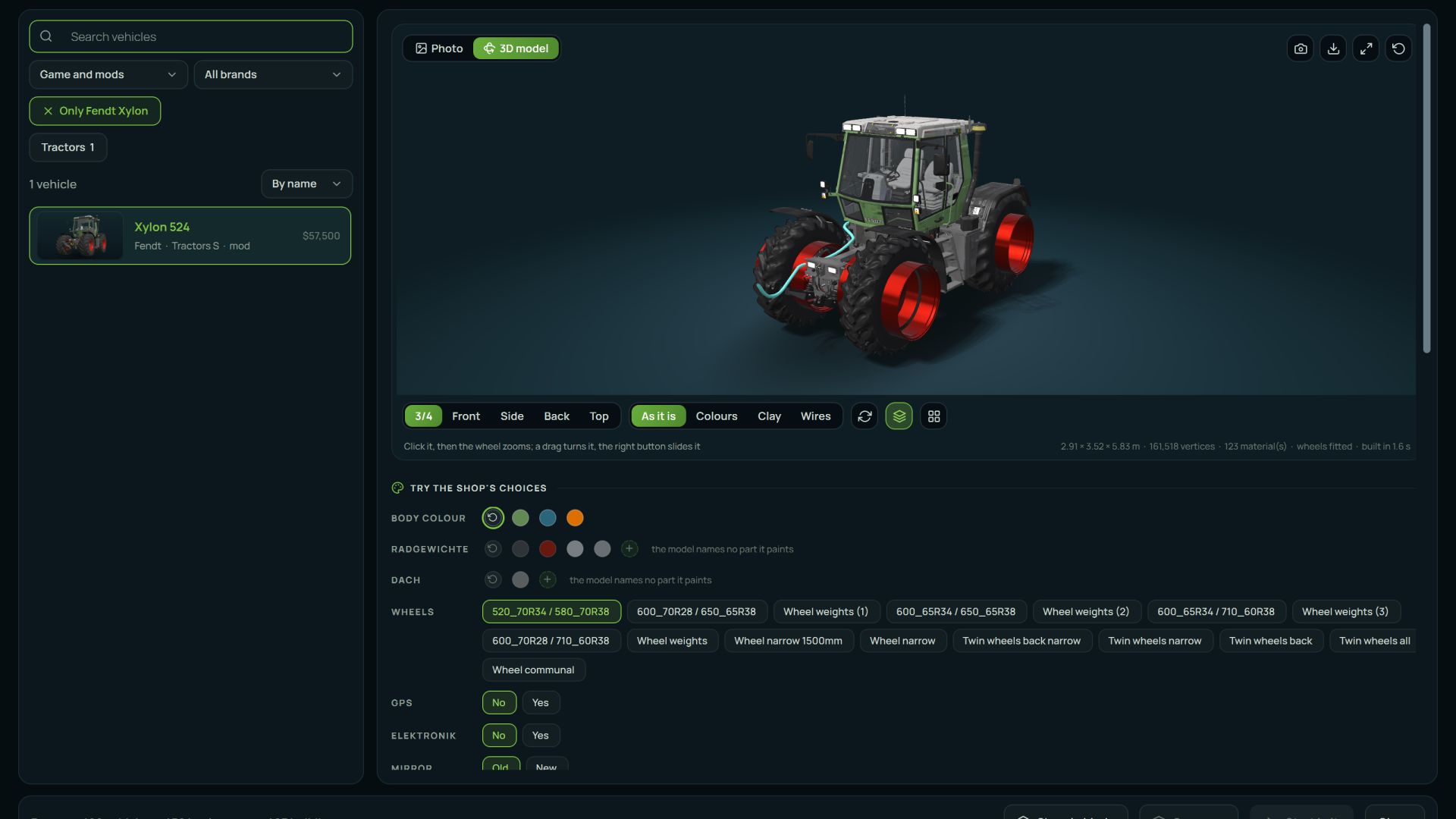
4) 3D preview.
Spin the model right inside the manager, with the textures and factory colours from the mod itself. It reads the native `.i3d` format directly, so there is nothing to convert.
5) Savegame editor
Edits a savegame directly, without launching the game:
- Money and loan, per farm
- Difficulty and time scale
- Autosave interval, fuel usage, growth mode and period length
- Game rules: stones, weeds, lime, snow, plowing, crop destruction, traffic, automatic motor start
- Helpers: whether they buy their own fuel, seeds and fertiliser
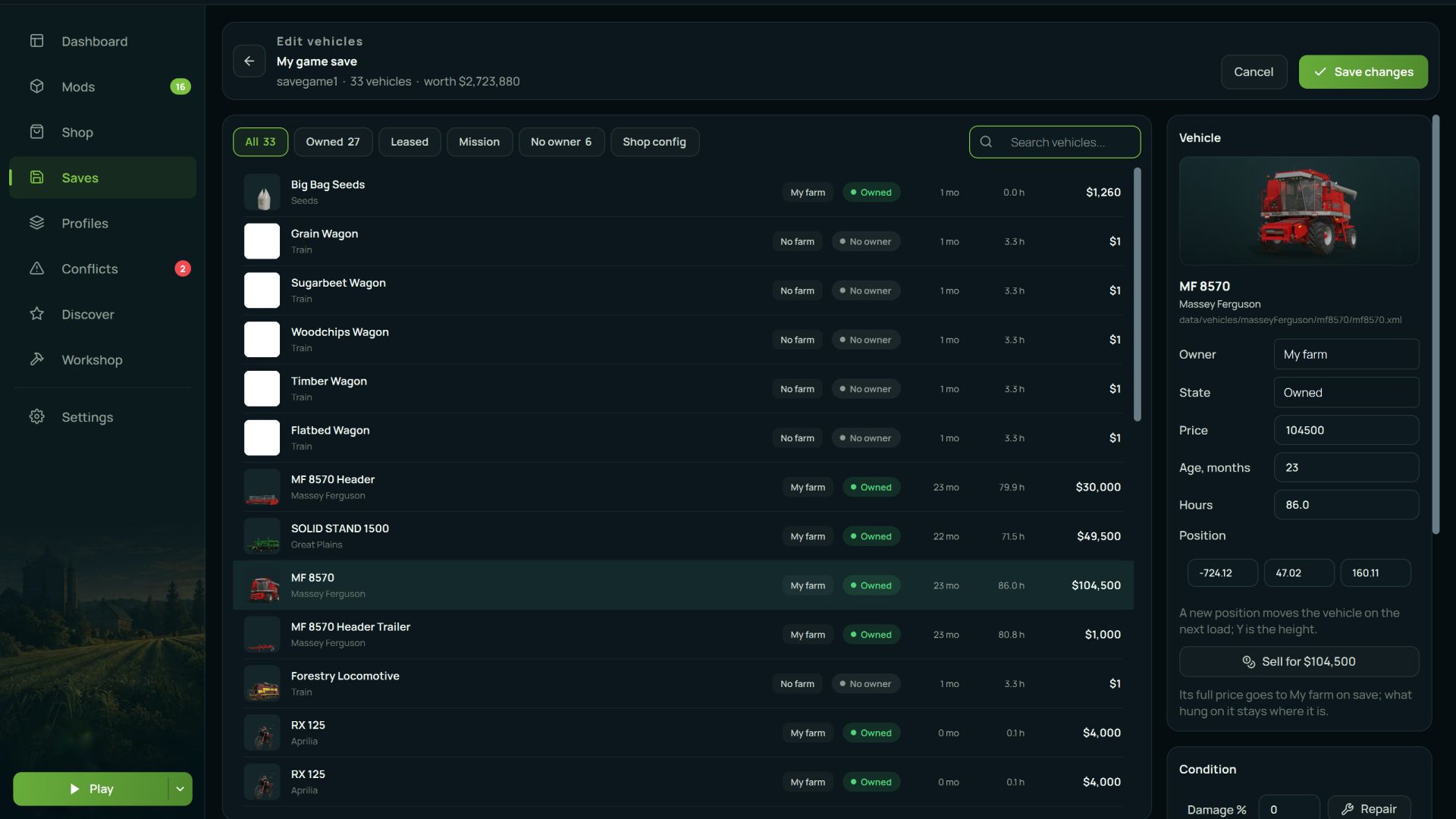
6) Vehicles in the savegame.
A separate screen listing every vehicle you own, with its position on the map and its operating hours, each one editable. Useful when a tractor has ended up outside the map and there is no way to reach it in game.
A backup is written before any change, and the manager tells you where it put it.
7) Savegame mod check
Compares the mods recorded in a savegame against what is actually installed. It separates the ones the save genuinely needs to load from the ones that are merely listed and do not matter.
—————————————————————————————————
Installation
Download AVAModManager-v0.9.5-setup.exe and run it. No administrator rights are needed, it installs into your own user folder.
Both the installer and the application are code-signed, so Windows shows a real publisher rather than "unknown".
It does not touch the game itself. It only works with your mods folder and with the savegames you point it at.
AVA Mod Manager 0.9.5.1
Missing mods handled right from their rows, the game's DLCs listed above the mods, health checks that stop crying wolf, and a backup store that no longer copies the whole mods folder before every switch.
New
- Missing mods from their rows: a mod that's on disk but switched off gets Switch on (plus a button above the list to switch them all on at once), a mod you don't have gets Find on ModHub and Install from file.
- DLCs above the mods on the Mods and Saves pages, read from both pdlc folders. A savegame's DLC is never flagged as a missing mod: installed ones show as installed, the rest say Not installed instead of being offered for download.
- Profile from checked mods: Select all, then Add to profile on the selection bar, or right-click any checked tile.
- After Play the manager notices when the game closes and reads the mods again, so a mod updated by the in-game ModHub shows its new version without a restart.
Fixed
- Health checks: the game's own log has the final say, so a mod the last run loaded is never called unloadable. XML mistakes the game forgives, misspelt elements and missing files are warnings, not "corrupt". Duplicates: a trailing number is a model, not a version, and same-named mods from different authors are two mods.
- Backup store on a diet: a restore point before a switch, profile change or redeploy now records where the archives stand instead of copying the whole mods folder (on a 6,000-mod library that was 190 GB, kept ten times over). Removals go to the Recycle Bin, dropped copies free their space at once, and archive-heavy restore points from earlier versions are cleaned out on first start. Backups you made yourself stay.
- Profiles from unpacked mods: folder mods were all reported as "could not be copied" because the library took archives only. Folders go in now, and the notice is a dialog with a scrolling list instead of a message box taller than the screen.
- Profile editor search matches author and category too, not just title and file name, same as the Mods page.
- Mods page: the checked-mods action bar sits above the list next to Select all, check marks survive a switch, the buttons on a mod's column act on the checked mods, card top corners are rounded, and the intro-video toggle is on the Settings page too.
New version - 0.9.5.1. A patch on top of 0.9.5, mostly from what you wrote to us in the first days: folders with thousands of mods are read once and remembered, conflicts tell real clashes from notes, and a mod goes into a savegame or out of it right from the list.
- Big mod folders: the folder is read once and remembered, so the next starts take a second or two and a rescan touches only the files that changed. The first read of a big folder shows a bar with the count. On 6,000 mods the first read went from 81 to 23 seconds, the next starts from 28 seconds to one or two, the conflict check from three minutes at every start to a third of a second, the Health page from 12 seconds to half a second. The same for BeamNG.drive and ETS2/ATS.
- Conflicts tell real clashes from notes: two maps never load together, a library script two mods share is the same code, two shop items with one name are a note. The badge on the menu counts only what needs you.
- Saves: put a mod into a savegame or take it out right from the mod list of the save, with a dated copy of the file first.
- A profile can simply be a folder of yours: the manager points the game at it, nothing is copied.
- Mods: a Duplicates filter next to Favourites, Select all for every mod the list shows, Shift click ranges on the checkboxes, a cross in the search field.
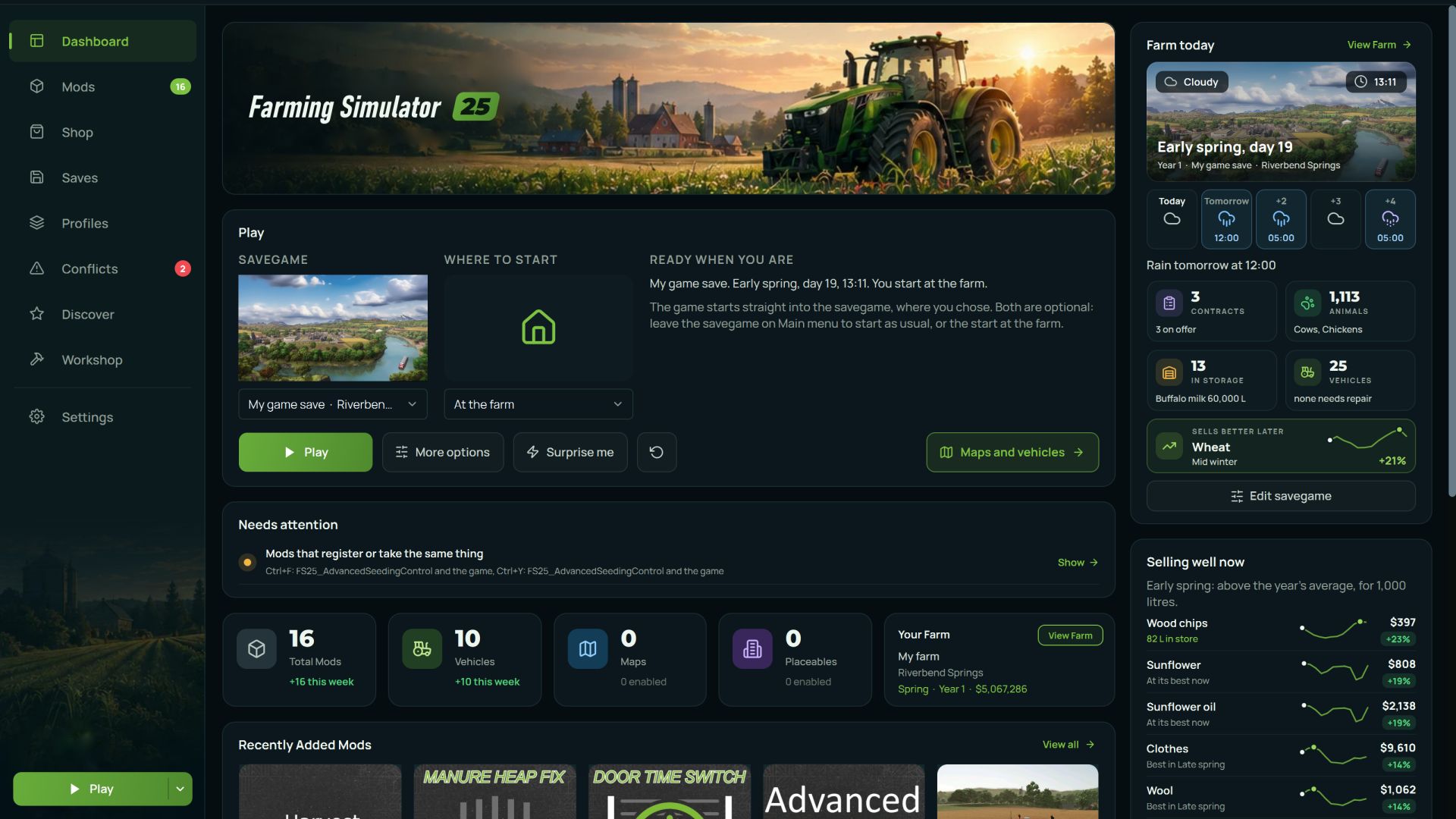
AVA Mod Manager 0.9.5: the Farming Simulator HUGE update. Version 0.9.5 rebuilds the whole Farming Simulator section from scratch. Your mods, your savegames and your farm in one place, with one-click install.
Full release notes: https://avamodmanager.com/updates.php
- BeamNG.drive has been rebuilt from scratch with a new dashboard, dark interface, card-based layout and a much shorter menu. All existing functions remain available.
- Drive window. Pick a map, vehicle and spawn point, configure time, weather, traffic, gravity, wind, fog, season, camera and other launch conditions, then start the game directly from AVA.
- Drive presets and recent sessions. Save complete launch setups, repeat recent drives in one click, or use Surprise me to generate a random map, vehicle, spawn point and conditions.
- Scenarios and vehicle comparison are built into the Drive window. Scenarios can be launched directly, while Compare shows two vehicles and their configurations side by side.
- Build window. Assemble a vehicle part by part, tune available parameters with sliders, and save the result as your own BeamNG.drive configuration.
- Mods are shown as picture tiles by default, with optional list view, tile size controls, search, categories, favourites, filters and bulk enable, disable and remove actions.
- Mod details now show what is actually inside each archive, including vehicles, configurations, skins, maps, UI apps, scripts, textures, models and sounds.
- The dashboard shows mod, vehicle, map and scenario counts, quick launch controls, recent mods and a Needs attention section for conflicts, missing dependencies and other problems.
- Garage loads faster and vehicle pages include more information about configurations, performance and installed content.
- Cheats page with 56 console commands and the game's own hotkeys. Hotkeys are read directly from the installed game files so they match your version.
- Health now combines mod conflicts, broken vehicle mods, BeamNG.drive log errors and manager history, with errors linked back to the mod that caused them where possible.
- BeamNG.drive now has its own Settings page for game and mod paths, startup behaviour, Play button behaviour, mod view options, Drive window preferences, conflict scanning and maintenance tools.
- A guided tour walks new users through the rebuilt BeamNG.drive section page by page.
- The Storage window no longer breaks when the billing server is unavailable and now shows an appropriate message instead.
- Everything added in this update is available in all six supported AVA translations.
The next update will fully rebuild Farming Simulator 25 with new design and functionality!
- Added support for a new game - The Sims 4. The category has its own unique design and functionality;
- Significantly expanded functionality for ETS, ATS, and BeamNG Drive. Design updates for these game pages are planned for future releases;
- Improved mod installation logic and modpack (profile) management;
- Improved automatic path detection;
- Fixed various visual bugs;
- Improved translations;
- Added a profile system and the ability to sign in via Modsfire;
- Added a snapshot and backup system, allowing you to save mods, save files, and other data both locally and to cloud storage;
- Added an auto-update system. From now on, you won't need to download the EXE installer again to install new updates - simply update directly from the application when a new version is available. (This does not apply to this version - this version must be installed the same way as before);
- Various fixes and improvements.
- Fixed the bugs that were found
- Globally expanded the ETS 2 and ATS categories: 3D model preview, logs, mod conflicts, health check, changed mod installation logic (mods are now embedded into the save), save management, load order, and many other features
- Improved the auto-detection logic for folders
- Improved the mod installation logic for most games