
REUPLOADING TO OTHER SITES IS PROHIBITED WITHOUT MY CONSENT!!
Multiplayer in development, playable but may contain bugs
Take real control of your tractor’s traction — engage 4x4, lock the differential and let the system react to actual wheel slip, not just to an assigned key.
This mod adds a fully switchable 4x4 traction system to compatible vehicles (tractors, trucks, harvesters, cars): engage/disengage the front axle when needed and toggle a differential lock that trades turning radius for maximum grip in mud, snow or during heavy work.
Features
Real rear-wheel slip detection — automatic modes react to actual wheel-slip physics, not just speed
Four driving modes, assigned to each vehicle by default:
Manual — always in control
Semi-automatic — engages with actual wheel slip, while manual control is always available
Automatic — the same logic, adjusted for vehicles with factory-fitted automatic 4WD (CVT/IVT transmissions)
Intelligent — continuous, proportional engagement in the Fendt style (without abrupt switching on/off)
Native tyre-pressure simulation during engagement — no dependency on any other mod
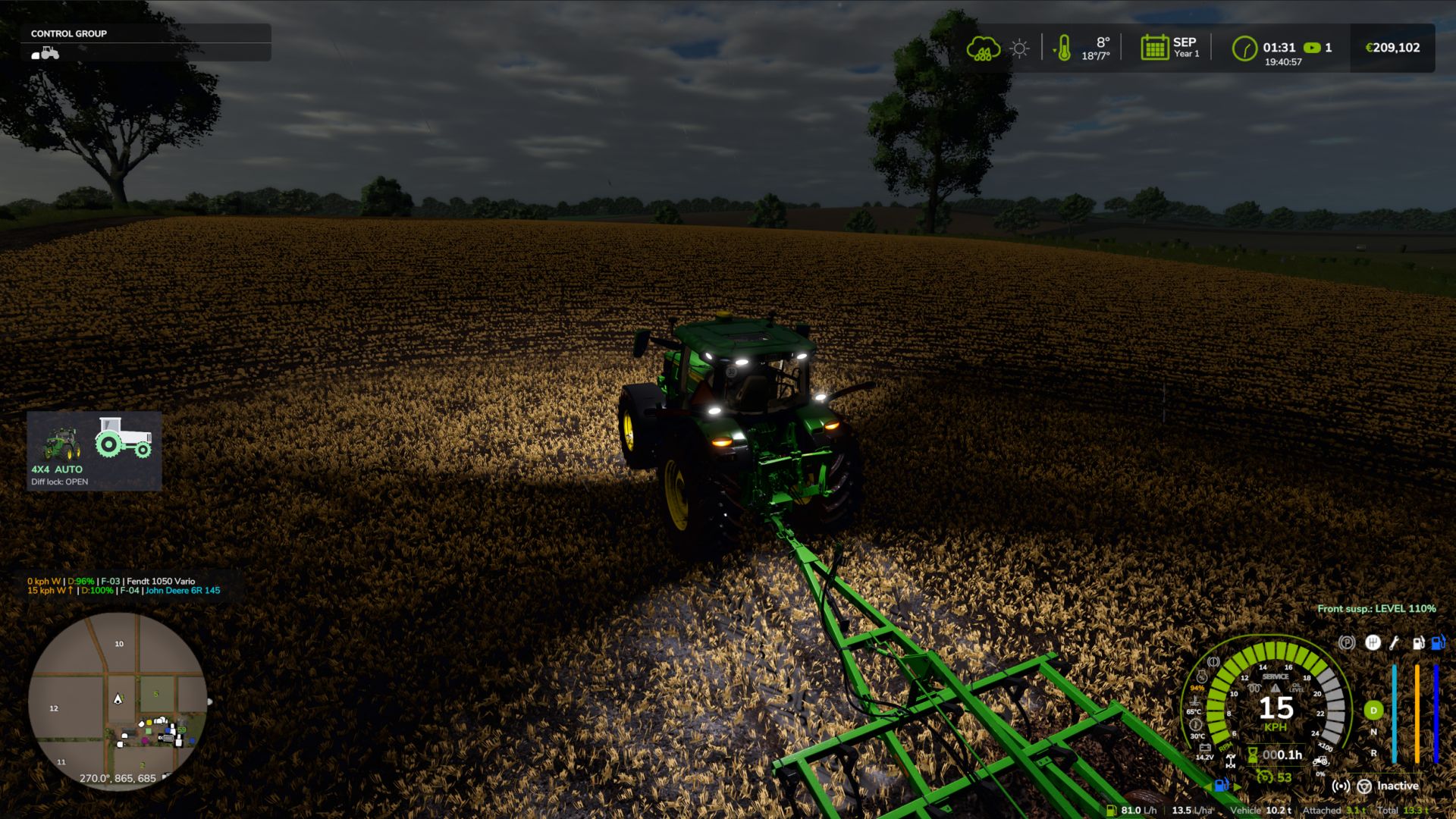
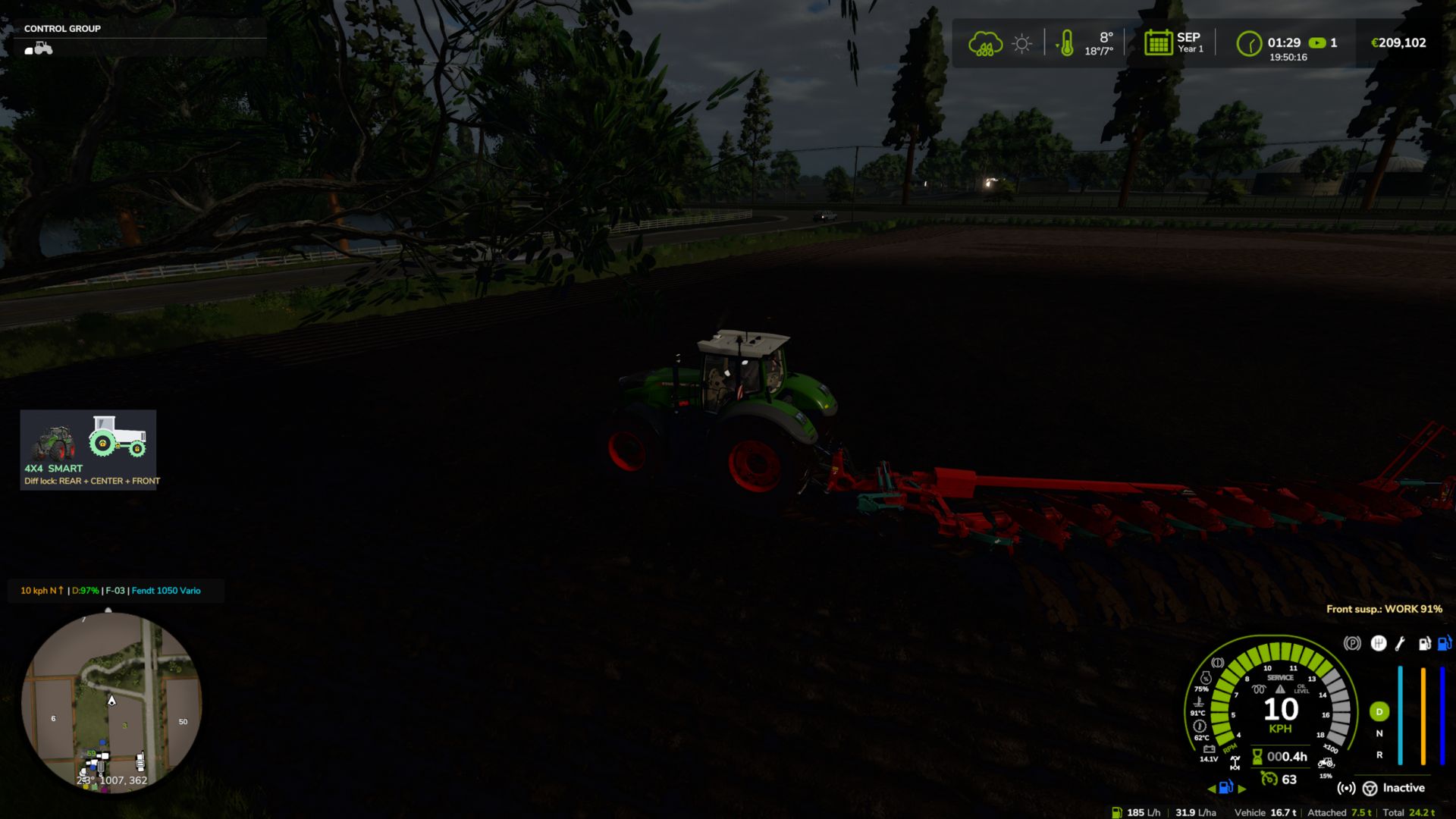
On-screen HUD with real-time status and adjustable position in the game Settings menu
Zero XML changes to any vehicle — the system integrates automatically into all compatible vehicles
Fixes
- AI helper: the combine could stand still reversing uphill and would not shift gear (reported by Patrik Vendelberger). The 4x4 now only works on the vehicle driven by a player; with an AI helper, stopped with nobody inside or parked, the vehicle uses the game's original differentials, tyre radius and speed limit.
- Missing translation for "Move 4WD HUD" (log warning) in 22 languages (reported by Patrik Vendelberger).
- HUD textures compressed – no more "raw format" warnings in the log.
- Faster game start: the settings menu section is now built only the first time you open Settings (it froze the start by ~4 s).
New: Vehicle Control Addon (VCA) compatibility (suggested by Cris669)
- VCA has its own 4WD and diff locks and rewrites the differentials every frame, so both mods were fighting. New option in Settings > General > 4x4 Traction System > "With Vehicle Control Addon":
- Command VCA (default): our automatic 4WD logic (slip, implement lowered, braking, tight turns, GPS prediction) switches VCA's 4WD and diff locks; VCA handles the differentials. CTIS, tyre pressure, HUD and telemetry keep working.
- Leave to VCA: only VCA works on that vehicle.
- Ignore VCA: old behaviour (not recommended).
- NOTE: the VCA integration should work, but it has not been tested in-game yet with VCA installed. Please test it and send feedback/log if something is not right.
- Checked with Headland Management and CVT Addon (suggested by Cris669): no conflicts found.
Thanks to Patrik Vendelberger and Cris669 for the reports!
New
- In-game settings menu: Esc -> Settings -> General -> "4x4 Traction System". HUD position and style, engage 4WD with implement lowered, disengage in tight turns, engage when braking, road speed limit, GPS prediction strength, locked centre torque bias, tyre pressure by hand, diagnostic log. Saved in modSettings/FS25_4x4TractionSystem.xml (kept for all savegames and when the mod is updated). No more editing files inside the zip.
- New minimalist HUD (optional, choose "Icon" in the menu): the tractor seen from the side.
- Green wheel = wheel with traction. The rear is always green; the front wheel and the drive shaft turn green when 4WD engages (grey in 2WD).
- Padlocks = diff locks: on the rear hub (rear), on the transfer box (centre) and on the front hub (front).
- A wheel that is slipping flashes green/red (each axle on its own). Both wheels flash with low field pressure at road speed.
- Tyre pressure under each wheel (front / rear, in bar) on tractors with CTIS or pressure by hand.
- Shop picture of the tractor you are driving next to the icon (can be switched off).
- Text underneath: 4X4 / 2X4, mode and active locks. Three sizes.
- Move the HUD (panel or icon) with the mouse: Ctrl+Shift+N, drag with the left button, right click / Esc / Enter to finish. The camera stays still while moving. Key can be changed in the Controls menu.
Note
- The new menu and icon texts are in English and Portuguese; other languages show English for now. working on translations soon
Fixes
- Mod tractors whose center differential lists the REAR axle first in the XML: in 2WD the torque went to the front axle and the rear axle ran free, and the rear diff lock had no effect (it worked only with 4WD engaged). Front and rear are now detected from the real wheel positions. Thanks to fermer25 for the report and video.
- Locked center now really locks on tractors with much smaller front tyres (e.g. MTZ/Belarus, front wheels turning 1.5x the rear): the rear could spin freely and 4WD seemed to do nothing. With the center locked, torque now goes to the axle that grips (up to 85% to the front when the rear spins; a wheel in the air counts as spinning). Switch off: centerLockBias = false.
- HUD: the reason no longer flickers between "implement lowered" and "GPS prediction".
New
- Tyre pressure by hand on every tractor: Ctrl+Alt+I inflate / Ctrl+Alt+O deflate, in 10% steps between the field and the road pressure.
- Without CTIS: only with the tractor stopped (~1.5 min to inflate, ~1 min to deflate), like with a compressor and gauge.
- With CTIS (Fendt VarioGrip, John Deere 8R): while driving, using the onboard compressor. Ctrl+Alt+P goes back to automatic (Fendt) / preset (8R).
- On-screen message with the chosen pressure (front / rear bar). Saved with the savegame and synced in multiplayer.
- John Deere 8R: real integrated CTIS with FIELD / ROAD presets (Ctrl+Alt+P), 0.8 -> 1.8 bar in ~1 min, deflate ~40 s.
- Tyres flatten visibly when the pressure goes down (like Variable Tire Pressure), with a bigger contact patch.
- With Soil & Draft Physics: the traction prediction uses the real implement draft force (ASABE D497), the real rear-axle load (weight transfer included) and the real tyre grip on the current soil (Brixius); tyre pressures per axle come from the real axle load; lower pressure = more grip and less wheel sinkage.
- Compatible with MoreRealistic: the traction prediction uses MoreRealistic's real implement draft force (also without Soil & Draft Physics).
- Compatible with Variable Working Depth (through Soil & Draft Physics, the draft follows the depth set in VWD).
- Works together with Hydraulic Suspension System.
- Translations for all 25 game languages.
Settings
- DriveModeConfig.lua: manualTirePressure (true/false), manualInflateMs, manualDeflateMs, centerLockBias (true/false).
NEW / FIXED
- Differentials now really work: rebuilt on the drivetrain node exactly like the game creates them (in FS25 the locks previously had no effect)
- Separate FRONT / CENTER / REAR diff locks (Ctrl+Alt+K / Ctrl+Alt+J / Ctrl+Alt+L) + quick cycle (Ctrl+K) — all rebindable
- Locked center respects the real front-axle lead (tyre size ratio + 2.5%): no more rear wheels spinning while the front axle brakes the tractor
- 2WD leaves the front axle free
- CTIS tyre pressure per axle from the real axle load and tyre load tables (with Soil Draft Physics); realistic -3.5% rolling radius instead of -15% (no more "flat" tyres)
- CTIS automatically disabled on tracked tractors
- New translations: DE, FR, ES, IT, PL, RU (plus EN, PT, BR) with google, errors are expected!!!
TESTED TOGETHER (no conflicts)
- Precision Farming 1.5.1.0
- Soil Draft Physics (beta) – optional; when installed, CTIS tyre pressure is calculated from the real axle load
- Realistic Mechanical Systems (RMS) 0.10.0.0
- Realistic Weather 1.2.0.0
- Fendt 1000 Vario Series, John Deere 8R Pack / 6R Large / Ripper 2100, Case IH Magnum CVX, Kubota M7, JCB Fastrac 4000, CLAAS Lexion 8000
- Real Three Point Attacher, Remove Frontloader Axle Locking, Vehicle Speed Sync, DashboardLive, Real Vehicle Cams, Universal Autoload
- Maps: Riverbend Springs, Redstone County
NOT RECOMMENDED TOGETHER (they also change wheels/differentials)
- Mud System Physics, REA Plus, Tractor Terrain Dynamics, Variable Tire Pressure
- EnhancedVehicle: turn off its differential/drive-mode functions if you use both
New
- Physical traction prediction (tractors with GPS): compares the required force (slope, rolling resistance, effort from LOWERED implements) with rear axle grip, according to the soil type and ground moisture.
- Front axle engagement by clutch on a ramp (~0.4 s), without jolts.
- Differential lock in 3 positions (Ctrl+K): open / rear / rear + front, with progressive engagement.
- Auto/smart: engages with the implement lowered in the field, when wheels are slipping, downhill with a load and at low speed under load; disengages during tight headland turns and at road speed; remains engaged for at least 6 s (no "flashing on and off").
- Automatic locks while working; they release when turning, braking or above 15 km/h (in all modes, for safety).
- Maximum speed with 4x4 engaged: 25 km/h (tractors/harvesters), 40 km/h (trucks/cars).
- No mode engages 4x4 above 20 km/h, not even with Ctrl+J.
- Tyre pressure (Fendt) follows field/road conditions, like the real VarioGrip.
- New HUD: live wheel slip, padlocks on locked axles and the REASON for each decision;
Fixed
- The terrain prediction remained high (e.g. 27%) simply because a heavy implement was attached, even when lifted.
- Braking activated 4x4 and the locks (wheel slip while braking no longer counted as a lack of traction).
- Multiplayer: Ctrl+J in automatic modes was undone by the dedicated server.
- Semi-automatic mode never disengages on its own (only the player can do so).
Multiplayer in development, playable but may contain bugs
Compatibility tested with the MudSystemPhysics and Tractor Terrain Dynamics mods
Behaviour fixes:
Continuous-track tractors (only 2 tracks, e.g. John Deere 8RT, Fendt Vario MT) are no longer affected by the 2WD/4WD system — it makes no mechanical sense for them.
Fixed the actual difference between "semiauto" and "auto" modes: semiauto now only engages automatically and never disengages automatically (this is always left to the player).
Terrain anticipation GPS now always reads, even above road speed (previously it always stayed at 0% in this situation).
Fixed implement mass reading (it was reading tonnes as if they were kg — underestimating the actual weight by 1000x).
Fixed false triggering of "smart" mode when braking and shifting into reverse.
Fixed being "stuck to the ground" when lowering a heavy implement (differential lock reacted too quickly to the initial spike).
Automatic system (semiauto/auto) now reacts much faster to real and sustained wheel slip — previously it could take dozens of seconds.
Fixed rapidly switching between 2WD/4WD when stopped in the field.
Fixed false triggering of semiauto when starting from a standstill (a normal and brief wheel-slip spike at the moment of take-off).
The "smart" mode (Fendt) has been isolated from the binary engagement logic — preventing interference between the smart mode's own hysteresis and the new detections.
New features:
Detection of "fieldwork in progress" (via the game's native GPS) and automatic "arming": when stationary/almost stationary in a field with the implement lowered for more than 2 seconds, 4WD engages directly.
Experimental support for engine load as an additional signal (disabled by default, available in DriveModeConfig.lua).
Features from previous versions (already included in this version):
Proprietary GPS/terrain-elevation anticipation system, without depending on another mod — only on each brand's top-of-the-range tractors (Fendt VarioGuide, John Deere JDLink, Case AFS Connect, New Holland IntelliSteer, Deutz-Fahr Agrosky, CLAAS EASY)
Proper 4WD terminal (Ctrl+Shift+G) — Status/Telemetry/Settings tabs, with wheel-slip thresholds and anticipation strength adjustable live, per vehicle
Per-tractor telemetry (total hours, hours in 4WD, hours with differential locked, number of engagements, distance in 4WD, GPS anticipations) — saved in the savegame, with a reset button
Savegame persistence of the 4WD state (engaged/differential locked) and adjusted Settings
Renewed HUD — capsule-style bars with glow, pulsing halo on active elements, without text overlap
Fix for the tyre-pressure conflict with FS25_MudSystemPhysics
Extended support for brands/models: John Deere 6R/8R/9RX, New Holland T8/T8000, Deutz-Fahr Series 7/8, CLAAS Xerion, McCormick X8 VT-Drive
MULTIPLAYER (tested on a real dedicated server):
- Differential detection on dedicated servers fixed; it previously always failed on the client side
- Toggling 4x4 (Ctrl+J) now synchronizes correctly between the server and clients
- Manual differential lock (Ctrl+K) now synchronizes correctly between the server and clients
- Automatic modes (auto/semiauto/smart) are calculated by the server and synchronized with all clients
- A player joining in the middle of a session immediately receives the correct state of every vehicle
REALISM:
- Ctrl+K (manual differential lock) respects a speed limit for engagement—it only locks when stationary or moving slowly, just like in a real transfer case
GENERAL:
- Internal diagnostic code removed
- Documentation and store description reorganized
Fendt Vario Grip Smart unchanged for now. looking more details how it works
New Features
Automatic differential lock
In "Auto" and "Smart" drive modes, the center differential lock now engages and disengages by itself under severe wheel slip, at low speed only (never on the road). "Semi-Automatic" and "Manual" modes still require Ctrl+K.
Shop upgrade: Semi-Automatic → Automatic
Tractors configured as "Semi-Automatic" now show a new configuration option in the store's Customize screen, letting you pay to upgrade that specific unit to full "Automatic" behavior (automatic diff lock included). This was added because many players didn't realize Semi-Automatic and Automatic tractors behave differently — the option is now labeled clearly:
Semi-Automatic (Diff Lock Manual) — free, default
Automatic (Diff Lock Automatic) — paid upgrade
Known Issues
there are several things that may need a tweak or fix. not all vehicles have real or near real specs
this was not tested in deept with other mods including mod tractors or maintenance scripts except my maintenance mod, so compatibility not full confirmed with other mods yet
Fixes
Excluded 3 grape harvesters with independent hydraulic wheel motors (ERO Grapeliner Series 7000, New Holland Braud 9070L, Gregoire GL) — these vehicles are always all-wheel-drive by design (four independent hydraulic motors, no mechanical differential to switch), so the mod no longer applies to them as well as to crowlers and tracked vehicles.
Crawlers and tracked vehicles no longer get 4x4 system
Documentation
Clarified the real difference between "Semi-Automatic" and "Automatic" modes in the in-game HUD hints, configuration comments, and readme: both engage/disengage the 4x4 itself automatically based on real wheel slip — the actual difference is that only "Automatic" (and "Smart") also lock the differential automatically.
Compatibility
Singleplayer only. No changes to save-game compatibility — existing installs can update directly.
Keybinds changed to Shift+Ctrl+J/K/N to avoid conflicts with other mods
Auto/semi-auto response is much faster (confirm delay cut from 2.5s to 0.9s)
The 2WD↔4WD switch in manual/semi-auto/auto is now a short smooth ramp instead of an instant on/off — no more jolt or momentary speed loss when the front axle engages under load
Optional soft compatibility with Hyper Realistic Maintenance 2, if you also run it (see below) — fully standalone otherwise
zasty chalk