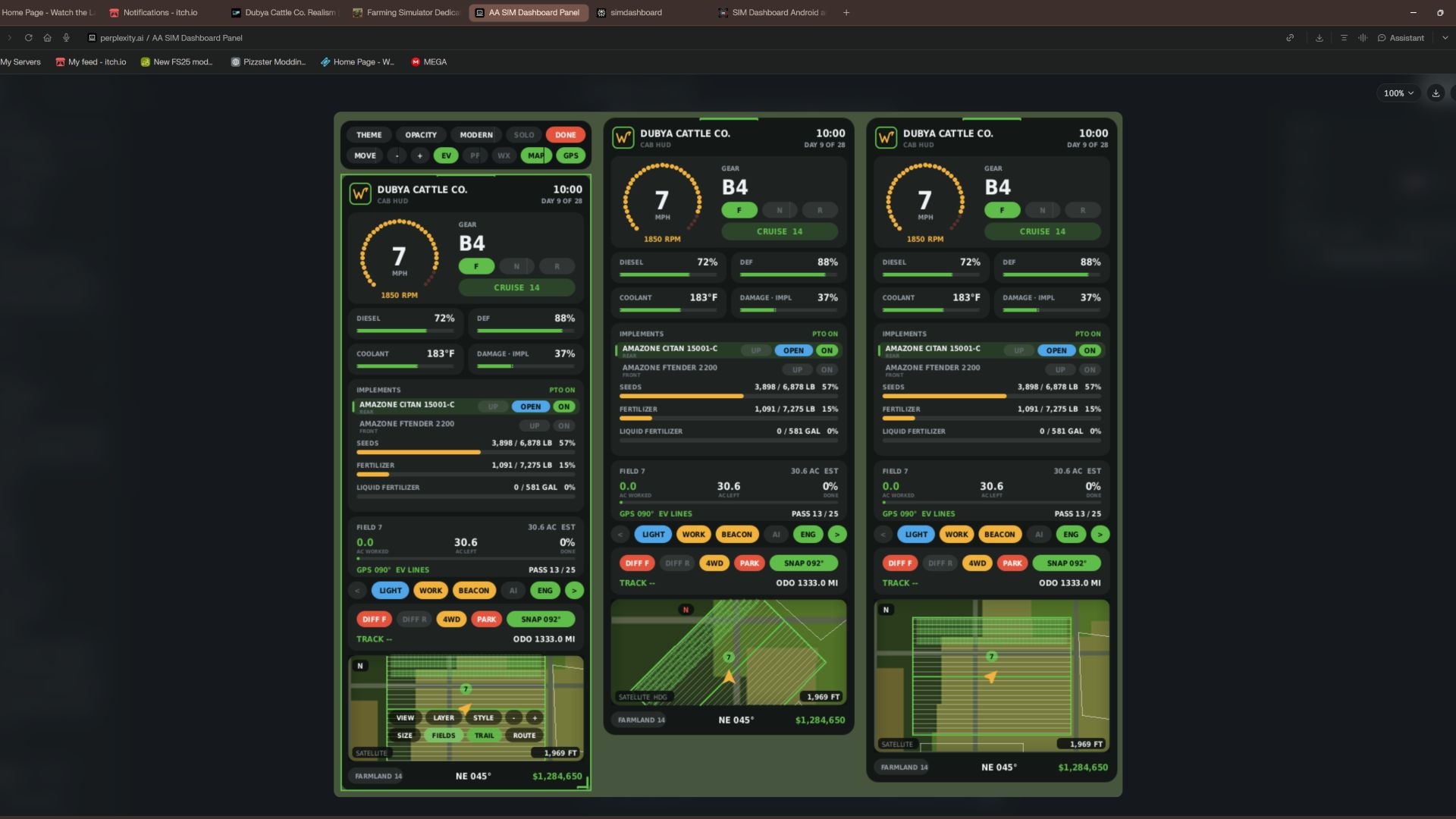

Dubya Cattle Co. Cab HUD for Farming Simulator 25
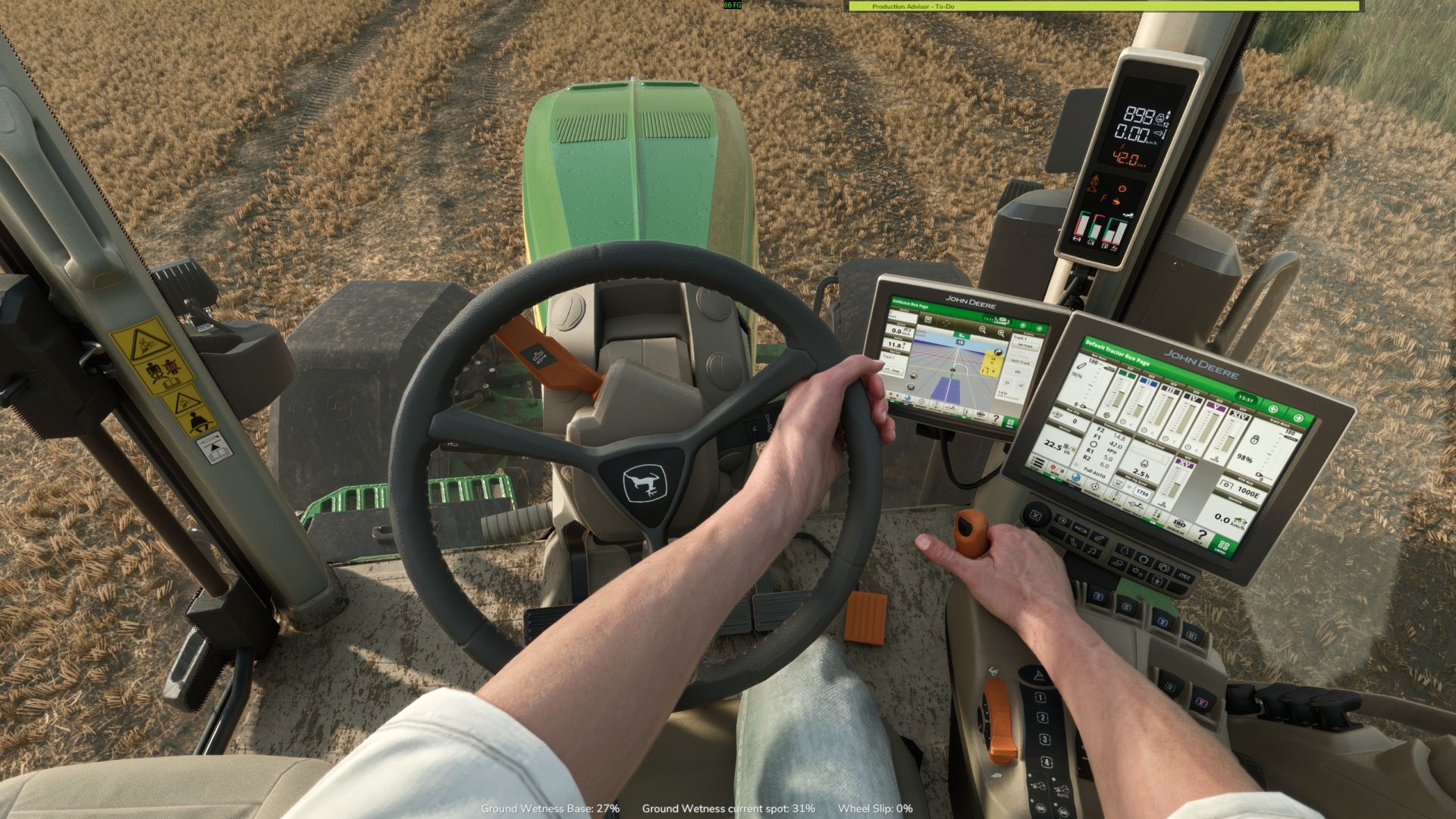
A full in-cab dashboard panel that puts everything you need while driving in one clean, movable, resizable window. Speed, engine, fuel, implements, Precision Farming data, a live mini map with field layers, and a 5-day weather forecast, all without opening a single menu.
The panel shows whenever you're in a vehicle and hides when you get out. It's client-side, so it works in single player and on multiplayer and dedicated servers, and each player sets it up their own way.
What the panel shows
Header
Dubya Cattle Co. logo
In-game day of the month and the time of day
Driving and engine
Speed (MPH) and engine RPM, with bar gauges
Direction (Forward / Neutral / Reverse), current gear, and cruise control speed
Diesel (or electric / methane), DEF level, coolant temperature in °F, and damage
Damage works like the game's repair bar: it shows the worst damage across the tractor and everything attached, labeled "DMG IMPL" when an implement is the worst one
Implements (like the game's control group HUD)
Every attached implement, including ones hooked to other implements, listed with front or rear position
The selected implement is highlighted
Each implement shows whether it's raised or lowered, folded or open (for implements that fold), and turned on
PTO on/off
Acres worked and left
Shows the field you're working, its size in acres, acres worked, acres left, and percent done, with a progress bar
In single player or when you host, it counts the exact area your implements process, so overlap isn't counted twice
On a dedicated server it estimates from working width and distance, marked EST
Each field and implement set gets its own counter, so a new job on the same field starts at zero
Fill tanks
Every tank across the tractor and implements, up to 4: for example seed and fertilizer on a seeder, or a front tank
Each tank shows its fill type, amount, capacity, and percentage with its own bar; empty tanks are named after what they hold
Bars turn amber at 20% and red at 10%
Lights and status
Indicators for turn signals, headlights, work lights, beacon, AI helper, and engine on/off
Enhanced Vehicle support (optional)
If you run the Enhanced Vehicle mod, an extra section shows:
Front and rear diff locks, 2WD / 4WD / FWD mode, and park brake
Steering snap angle, track number, work width, and headland distance
Odometer and trip meter
Precision Farming support (optional)
If Precision Farming is installed, the panel shows:
The soil type under your tractor
Sprayers and spreaders: pH or nitrogen, current and target value, application rate, and auto / manual mode (amber means you're still under target)
Seeders: seed rate, auto / manual mode, and tramline width
Combines: yield in t/ha and the percentage of yield potential
Mini map
Three views (Right Ctrl + Y): 2D north up, 2D heading up (the map turns with you and a red N shows where north is), and a live 3D chase view from above and behind the tractor
North-up map of your farm, using your map's own overview image, with an arrow showing your heading
4 zoom levels: 300 m, 600 m, 1.2 km, 2.4 km across
Field layers, using the same colors as the game's map menu, with a legend:
Field Work: plowed, cultivated, stubble tillage, seedbed
Crops: growing, ready to harvest, harvested, withered
Fertilized: fertilizer levels (replaced by PF Nitrogen when Precision Farming is installed)
Needs Work: needs lime, plowing, or rolling
Weeds: weeds and stones
Precision Farming: soil types, pH, nitrogen, yield, and seed rate
Layers refresh every 15 seconds, so fresh work shows up as you go
5 map styles: Standard, Satellite, Topo (with grid), Dark, and Night
Weather forecast
Today plus the next 4 days
Weather icon for each day (the worst weather expected during working hours)
High and low temperatures in your game's °F or °C setting
Rain, storm, hail, and snow days highlighted in amber
Footer
Farmland number, compass heading in degrees, and your farm's money
Customization
Modern layout (default): rounded cards, an arc-style RPM gauge around the speed readout, slim pill gauges and pill-shaped buttons. The original Classic layout is one key press away.
Move the panel to preset screen positions, or drag it anywhere with the mouse
Resize it with hotkeys, or drag the bottom-right corner
10 color themes plus a custom theme you can set in the settings file
Adjustable background opacity
Turn each section on or off: Enhanced Vehicle, Precision Farming, map, forecast
Solo mode hides the game's own HUD and keeps only this panel, for a clean cinematic cab view. Enhanced Vehicle's guide lines and track numbers stay visible. The game HUD comes back when you get out of the vehicle.
All settings save automatically to modSettings/FS25_DubyaHUD.xml
Controls
Every key uses Right Ctrl, and all of them can be changed in Options → Controls under "Dubya HUD".
Keys Action
Right Ctrl + H Show / hide the panel
Right Ctrl + J Move to next screen position
Right Ctrl + K Smaller
Right Ctrl + L Bigger
Right Ctrl + C Next color theme
Right Ctrl + B Background opacity
Right Ctrl + O Solo mode (hide game HUD)
Right Ctrl + E Show / hide Enhanced Vehicle info
Right Ctrl + P Show / hide Precision Farming info
Right Ctrl + F Show / hide weather forecast
Right Ctrl + M Show / hide mini map
Right Ctrl + N Map zoom
Right Ctrl + G Map layer
Right Ctrl + V Map style
Right Ctrl + U Panel layout (modern / classic)
Right Ctrl + Y Map view (2D north up / 2D heading up / 3D)
Mouse: when the cursor is showing, drag the panel's header to move it and its bottom-right corner to resize it.
Installation
Put FS25_DubyaHUD.zip in your mods folder (Documents\My Games\FarmingSimulator2025\mods). Don't unzip it, and keep the file name exactly as is.
Enable the mod when you load or create your save.
For a dedicated server, upload the same zip to the server's mods folder and enable it there.
Get in any vehicle. The panel appears automatically.
Compatibility
Works on its own. Enhanced Vehicle and Precision Farming are optional; their sections only appear when those mods are active.
Other mods' HUDs, such as AutoDrive or Courseplay, aren't hidden by solo mode.
If something isn't working, check log.txt for lines starting with "DubyaHUD".
v2.2.0.0
Adicionado
- Camada de mapa automática: ao entrar em um campo, o mapa alterna para a camada correspondente à tarefa em execução
- Arado, cultivador, grade, subsolador, rolo compactador, triturador, recolhedor de pedras ou semeadora: Trabalho no Campo
- Fertilizante, fertilizante líquido, chorume, esterco ou digestato: Nitrogênio (PF) (ou "Fertilizado", caso o Precision Farming não esteja ativo)
- Calcário: pH (PF) (ou "Necessita de Tratamento", caso o Precision Farming não esteja ativo)
- Herbicida ou capinadora: Plantas Daninhas
- Colheitadeira: Produtividade (PF) (ou "Culturas", caso o Precision Farming não esteja ativo); segadora ou enfardadora: Culturas
- Pulverizadores e distribuidores são identificados com base no conteúdo atual do tanque, no último produto utilizado ou no produto fornecido por um tanque frontal
- Uma camada selecionada manualmente permanece ativa até que a tarefa seja alterada ou você entre em outro campo
- O botão "AUTO" no mapa, dentro do modo de interação, ativa ou desativa a seleção automática de camadas
Removido
- Rastro de cobertura (desenho, salvamento e o respectivo botão no mapa); dados de rastros salvos anteriormente serão ignorados
---
v2.1.0.0
Adicionado
- A rota GPS utiliza o sistema nativo do jogo (Assistente de Direção/Steering Assist), permitindo o uso de linhas de GPS mesmo sem o mod "Enhanced Vehicle"
- Ao entrar em um campo, o veículo passa a utilizar o Assistente de Direção; o jogo identifica o campo, gera o trajeto e exibe as linhas no ambiente
- O modo de IA padrão é retomado cerca de 8 segundos após sair do campo, ou ao desembarcar do veículo/trocar de veículo
- O mapa na interface (HUD) exibe as linhas do jogo, com a linha atual destacada O cartão do campo exibe LINHA x / y
- Modos de GPS no botão da barra de ferramentas de GPS: AUTO, GAME, EV, OFF
- Trabalho de campo salvo: a área trabalhada (em acres) é salva por arquivo de jogo (ou por servidor, no modo multijogador), a cada 30 segundos, ao salvar o jogo e ao sair
- Campos já trabalhados, ao serem acessados novamente em um dia posterior, reiniciam automaticamente para a próxima temporada
- Botão RESET no cartão do campo, no modo de interação (clique duas vezes para confirmar)
---
v2.0.0.0
Adicionado
- Modo de interação (Ctrl Direito + X): cursor do mouse, a câmera para de seguir o movimento do mouse, HUD com elementos clicáveis
- Luzes, luzes de trabalho, giroflex, setas e motor
- Seleção de implementos; levantar/abaixar, dobrar/desdobrar e ligar/desligar através de botões específicos
- Integração com o mod "Enhanced Vehicle" (EV): bloqueio de diferencial, tração 4x4, freio de estacionamento, alinhamento (snap) e hodômetro/medidor de percurso
- Botões no mapa para: visualização, camadas, estilo, zoom, tamanho, contornos dos campos e rota; o zoom do mapa é controlado pela rodinha do mouse
- Barra de ferramentas para: tema, opacidade, layout, modo solo, movimentação, redimensionamento e exibição de EV, PF (Precision Farming), previsão do tempo, mapa e GPS
- Arraste o cabeçalho para mover; arraste o canto para redimensionar
- Saia do modo de interação usando Ctrl Direito + X, o botão "DONE" (Concluído) ou saindo do veículo
- Rota de GPS automática ao entrar em um campo: segue a borda reta mais longa do campo; a primeira passada ocorre a meia largura de trabalho para dentro da borda
- Ativa as linhas de trajeto do "Enhanced Vehicle" (se instalado); o mapa no HUD reflete as alterações feitas no "Enhanced Vehicle"
- O cartão do campo exibe a direção (heading) da rota e o número da passada
- Ctrl Direito + R recalcula a rota
- Melhorias no mapa
- Contornos e numeração dos campos, com destaque para o campo em que você se encontra
- Três tamanhos de mapa (Ctrl Direito + T)
- Visualização com orientação na direção do movimento ("heading-up"): a seta indicadora fica posicionada mais abaixo, permitindo uma visão maior à frente
- Os contornos são exibidos apenas para os campos que estão visíveis na tela
Alterado
- Todos os atalhos de teclado anteriores foram mantidos
---
v1.9.0.0
Alterado
- Unidades imperiais aplicadas em todo o sistema, independentemente da configuração de unidades do jogo
- Líquidos exibidos em galões; Grãos em bushels (pesos de bushel padrão do USDA); demais itens em libras (lb)
- Velocidade e velocidade de cruzeiro em mph (milhas por hora); temperatura do líquido de arrefecimento e previsão do tempo em °F (graus Fahrenheit)
- Largura de trabalho, cabeceiras, linhas de tráfego (tramlines) e escala do mapa em pés (ft); hodômetro e distância de percurso em milhas (mi)
- Taxas de agricultura de precisão em lb/ac (libras por acre) ou gal/ac (galões por acre); densidade de semeadura em lb/ac ou sementes/ac; nitrogênio em lb/ac
- Produtividade na colheita em bu/ac (bushels por acre) para grãos, e em lb/ac (libras por acre) para outras culturas