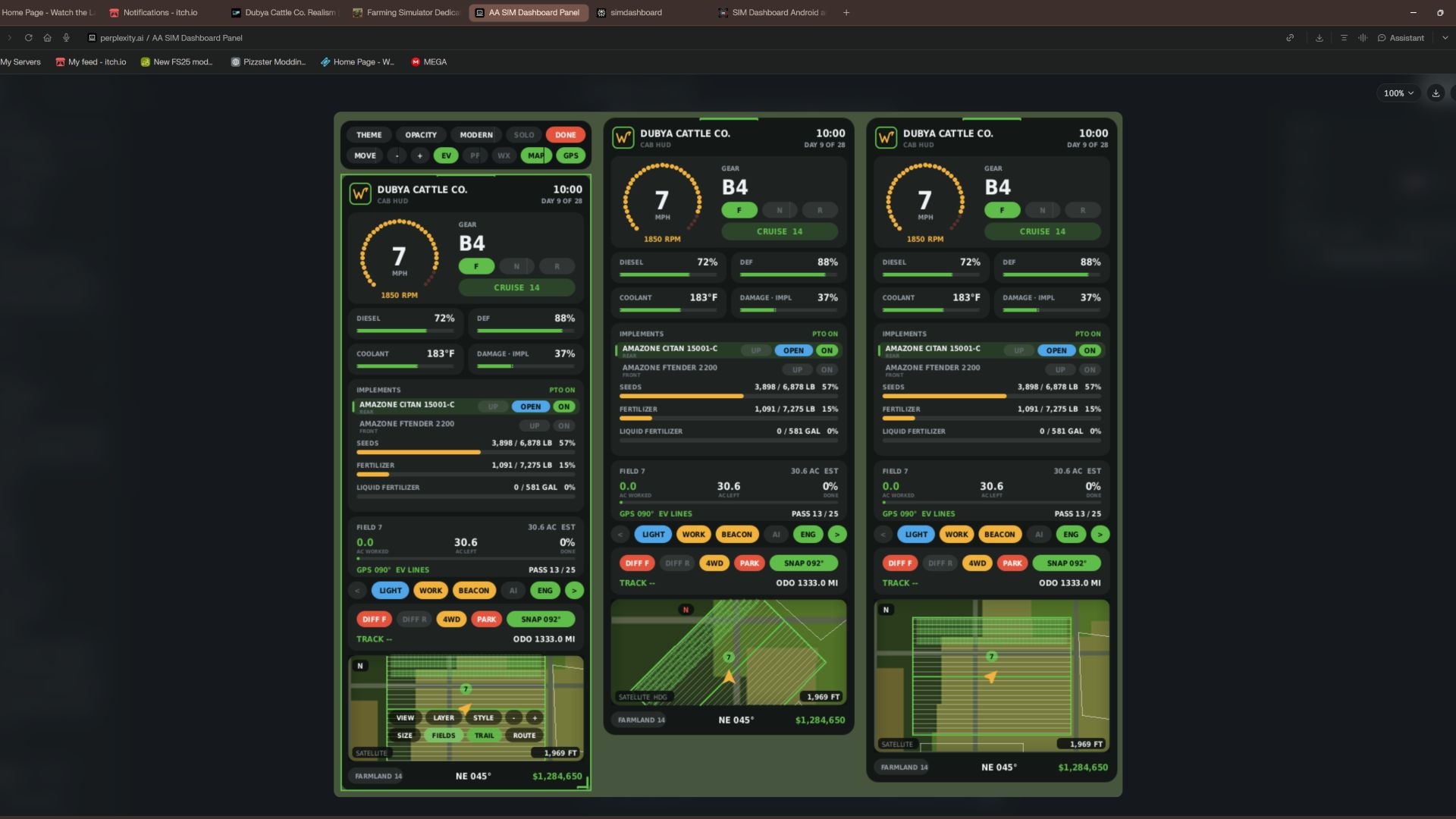

Dubya Cattle Co. Cab HUD for Farming Simulator 25
A full in-cab dashboard panel that puts everything you need while driving in one clean, movable, resizable window. Speed, engine, fuel, implements, Precision Farming data, a live mini map with field layers, and a 5-day weather forecast, all without opening a single menu.
The panel shows whenever you're in a vehicle and hides when you get out. It's client-side, so it works in single player and on multiplayer and dedicated servers, and each player sets it up their own way.
What the panel shows
Header
Dubya Cattle Co. logo
In-game day of the month and the time of day
Driving and engine
Speed (MPH) and engine RPM, with bar gauges
Direction (Forward / Neutral / Reverse), current gear, and cruise control speed
Diesel (or electric / methane), DEF level, coolant temperature in °F, and damage
Damage works like the game's repair bar: it shows the worst damage across the tractor and everything attached, labeled "DMG IMPL" when an implement is the worst one
Implements (like the game's control group HUD)
Every attached implement, including ones hooked to other implements, listed with front or rear position
The selected implement is highlighted
Each implement shows whether it's raised or lowered, folded or open (for implements that fold), and turned on
PTO on/off
Acres worked and left
Shows the field you're working, its size in acres, acres worked, acres left, and percent done, with a progress bar
In single player or when you host, it counts the exact area your implements process, so overlap isn't counted twice
On a dedicated server it estimates from working width and distance, marked EST
Each field and implement set gets its own counter, so a new job on the same field starts at zero
Fill tanks
Every tank across the tractor and implements, up to 4: for example seed and fertilizer on a seeder, or a front tank
Each tank shows its fill type, amount, capacity, and percentage with its own bar; empty tanks are named after what they hold
Bars turn amber at 20% and red at 10%
Lights and status
Indicators for turn signals, headlights, work lights, beacon, AI helper, and engine on/off
Enhanced Vehicle support (optional)
If you run the Enhanced Vehicle mod, an extra section shows:
Front and rear diff locks, 2WD / 4WD / FWD mode, and park brake
Steering snap angle, track number, work width, and headland distance
Odometer and trip meter
Precision Farming support (optional)
If Precision Farming is installed, the panel shows:
The soil type under your tractor
Sprayers and spreaders: pH or nitrogen, current and target value, application rate, and auto / manual mode (amber means you're still under target)
Seeders: seed rate, auto / manual mode, and tramline width
Combines: yield in t/ha and the percentage of yield potential
Mini map
Three views (Right Ctrl + Y): 2D north up, 2D heading up (the map turns with you and a red N shows where north is), and a live 3D chase view from above and behind the tractor
North-up map of your farm, using your map's own overview image, with an arrow showing your heading
4 zoom levels: 300 m, 600 m, 1.2 km, 2.4 km across
Field layers, using the same colors as the game's map menu, with a legend:
Field Work: plowed, cultivated, stubble tillage, seedbed
Crops: growing, ready to harvest, harvested, withered
Fertilized: fertilizer levels (replaced by PF Nitrogen when Precision Farming is installed)
Needs Work: needs lime, plowing, or rolling
Weeds: weeds and stones
Precision Farming: soil types, pH, nitrogen, yield, and seed rate
Layers refresh every 15 seconds, so fresh work shows up as you go
5 map styles: Standard, Satellite, Topo (with grid), Dark, and Night
Weather forecast
Today plus the next 4 days
Weather icon for each day (the worst weather expected during working hours)
High and low temperatures in your game's °F or °C setting
Rain, storm, hail, and snow days highlighted in amber
Footer
Farmland number, compass heading in degrees, and your farm's money
Customization
Modern layout (default): rounded cards, an arc-style RPM gauge around the speed readout, slim pill gauges and pill-shaped buttons. The original Classic layout is one key press away.
Move the panel to preset screen positions, or drag it anywhere with the mouse
Resize it with hotkeys, or drag the bottom-right corner
10 color themes plus a custom theme you can set in the settings file
Adjustable background opacity
Turn each section on or off: Enhanced Vehicle, Precision Farming, map, forecast
Solo mode hides the game's own HUD and keeps only this panel, for a clean cinematic cab view. Enhanced Vehicle's guide lines and track numbers stay visible. The game HUD comes back when you get out of the vehicle.
All settings save automatically to modSettings/FS25_DubyaHUD.xml
Controls
Every key uses Right Ctrl, and all of them can be changed in Options → Controls under "Dubya HUD".
Keys Action
Right Ctrl + H Show / hide the panel
Right Ctrl + J Move to next screen position
Right Ctrl + K Smaller
Right Ctrl + L Bigger
Right Ctrl + C Next color theme
Right Ctrl + B Background opacity
Right Ctrl + O Solo mode (hide game HUD)
Right Ctrl + E Show / hide Enhanced Vehicle info
Right Ctrl + P Show / hide Precision Farming info
Right Ctrl + F Show / hide weather forecast
Right Ctrl + M Show / hide mini map
Right Ctrl + N Map zoom
Right Ctrl + G Map layer
Right Ctrl + V Map style
Right Ctrl + U Panel layout (modern / classic)
Right Ctrl + Y Map view (2D north up / 2D heading up / 3D)
Mouse: when the cursor is showing, drag the panel's header to move it and its bottom-right corner to resize it.
Installation
Put FS25_DubyaHUD.zip in your mods folder (Documents\My Games\FarmingSimulator2025\mods). Don't unzip it, and keep the file name exactly as is.
Enable the mod when you load or create your save.
For a dedicated server, upload the same zip to the server's mods folder and enable it there.
Get in any vehicle. The panel appears automatically.
Compatibility
Works on its own. Enhanced Vehicle and Precision Farming are optional; their sections only appear when those mods are active.
Other mods' HUDs, such as AutoDrive or Courseplay, aren't hidden by solo mode.
If something isn't working, check log.txt for lines starting with "DubyaHUD".
v2.2.0.0
Toegevoegd
- Automatische kaartlaag: wanneer u zich op een veld bevindt, schakelt de kaart over naar de laag voor de betreffende taak.
- Ploeg, cultivator, schijveneg, woelploeg, rol, mulchmachine, steenraper of zaaimachine: Veldwerk
- Meststof, vloeibare meststof, drijfmest, mest of digestaat: PF Stikstof (Bemest zonder precisielandbouw)
- Kalk: PF pH (Vereist bewerking zonder precisielandbouw)
- Onkruidverdelger of wiedmachine: Onkruid
- Maaidorser: PF Opbrengst (Gewassen zonder precisielandbouw); maaier of balenpers: Gewassen
- Spuitmachines en strooiers worden afgelezen op basis van de inhoud van de tank, de laatst aanwezige inhoud of de toevoer vanuit een voorste tank.
- Een laag die u zelf selecteert, blijft behouden totdat de taak verandert of u een ander veld betreedt.
- De knop AUTO-kaart in de interactiemodus schakelt de automatische laag in of uit.
Verwijderd
- Dekkingsspoor (tekenen, opslaan en de bijbehorende kaartknop); Oudere opgeslagen routegegevens worden genegeerd
---
v2.1.0.0
Toegevoegd
- GPS-route maakt gebruik van de eigen GPS van het spel (Stuurassistentie), waardoor GPS-lijnen werken zonder Verbeterd Voertuig
- Bij het betreden van een veld schakelt het voertuig over naar Stuurassistentie; het spel detecteert het veld vanaf de grond, bouwt de route en toont de lijnen in de spelwereld
- Je normale AI-modus keert terug ongeveer 8 seconden nadat je het veld hebt verlaten, of wanneer je uitstapt of van voertuig wisselt
- De HUD-kaart toont de lijnen van het spel, waarbij de huidige lijn is gemarkeerd; De veldkaart toont LIJN x / y
- GPS-modi via de knop op de GPS-werkbalk: AUTO, GAME, EV, UIT
- Opgeslagen veldwerk: bewerkte acres worden per 'savegame' (en per server in multiplayer) opgeslagen; dit gebeurt elke 30 seconden, bij het opslaan van het spel en bij het afsluiten
- Veldwerk op reeds voltooide velden wordt op een latere dag automatisch opnieuw gestart voor het volgende seizoen
- RESET-knop op de veldkaart in de interactiemodus (bevestig door dubbel te klikken)
---
v2.0.0.0
Toegevoegd
- Interactiemodus (Rechter Ctrl + X): muiscursor, camera volgt de muis niet langer, aanklikbare HUD
- Verlichting, werklampen, zwaailichten, richtingaanwijzers en motor
- Werktuigen selecteren; heffen/neerlaten, in-/uitklappen en inschakelen via de bijbehorende bedieningselementen
- 'Enhanced Vehicle'-functies: sperdifferentiëlen, vierwielaandrijving (4WD), parkeerrem, 'snap'-functie (spoorvolging) en kilometerteller/ritregistratie
- Kaartknoppen voor weergave, lagen, stijl, zoom, grootte, veldomtrekken en route; in- en uitzoomen op de kaart met het muiswiel
- Werkbalk voor thema, dekking (opacity), lay-out, 'solo'-modus, verplaatsen, formaat aanpassen en het tonen van EV, PF, weersverwachting, kaart en GPS
- Versleep de koptekst om te verplaatsen, versleep de hoek om het formaat aan te passen
- Afsluiten via Rechter Ctrl + X, de knop 'DONE' (klaar), of door uit het voertuig te stappen
- Automatische GPS-route bij het betreden van een veld: volgt de langste rechte zijde van het veld, waarbij de eerste werkgang op een halve werkbreedte vanaf de rand wordt geplaatst
- Activeert de spoorlijnen van 'Enhanced Vehicle' indien geïnstalleerd; de kaart in de HUD volgt wijzigingen die in 'Enhanced Vehicle' worden doorgevoerd
- De veldkaart toont de koers van de route en het nummer van de werkgang
- Rechter Ctrl + R herberekent de route
- Kaartverbeteringen
- Veldomtrekken en veldnummers, waarbij het veld waarin je je bevindt wordt gemarkeerd
- Drie kaartformaten (Rechter Ctrl + T)
- Bij de 'koers-boven'-weergave (heading-up) wordt de pijl lager geplaatst, zodat je meer van de omgeving voor je ziet
- Omtrekken worden alleen getekend voor velden die in beeld zijn
Gewijzigd
- Alle eerdere sneltoetsen blijven behouden
---
v1.9.0.0
Gewijzigd
- Overal imperiale eenheden (inches, gallons, etc.), ongeacht de eenheidsinstelling in het spel
- Vloeistoffen worden weergegeven in gallons; Graan in bushels (USDA-standaardgewichten in bushels); al het overige in ponden
- Snelheid en kruissnelheid in mph; koelvloeistof en weersverwachting in °F
- Werkbreedte, kopakker, spoorlijnen en kaartschaal in voet; kilometerteller en rit in mijlen
- Precisielandbouwdoseringen in lb/acre of gal/acre; zaaidichtheid in lb/acre of zaden/acre; stikstof in lb/acre
- Maaidorseropbrengst in bushel/acre voor graan, lb/acre voor andere gewassen