
Dubya Cattle Co. Cab HUD for Farming Simulator 25
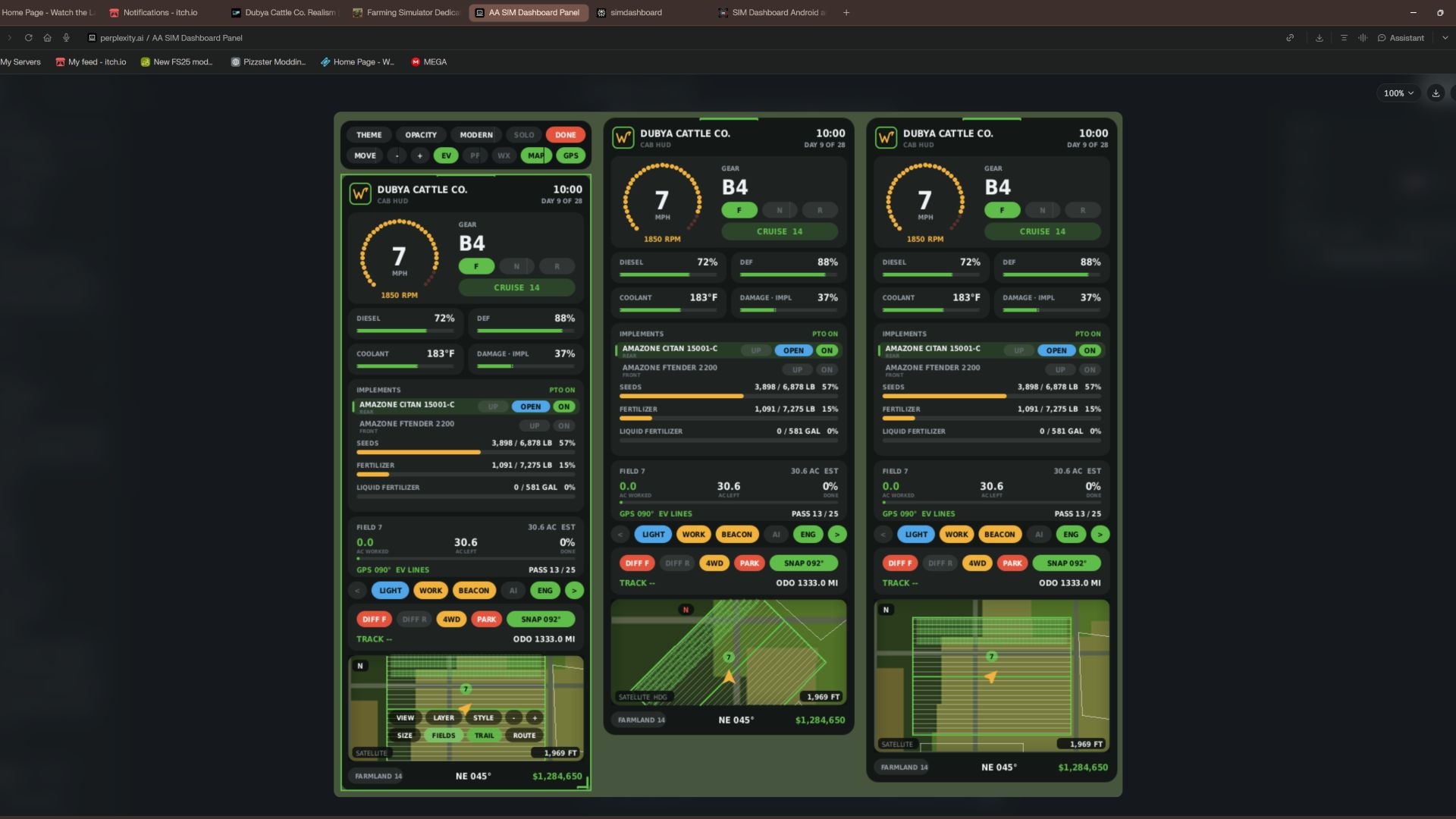
A full in-cab dashboard panel that puts everything you need while driving in one clean, movable, resizable window. Speed, engine, fuel, implements, Precision Farming data, a live mini map with field layers, and a 5-day weather forecast, all without opening a single menu.
The panel shows whenever you're in a vehicle and hides when you get out. It's client-side, so it works in single player and on multiplayer and dedicated servers, and each player sets it up their own way.
What the panel shows
Header
Dubya Cattle Co. logo
In-game day of the month and the time of day
Driving and engine
Speed (MPH) and engine RPM, with bar gauges
Direction (Forward / Neutral / Reverse), current gear, and cruise control speed
Diesel (or electric / methane), DEF level, coolant temperature in °F, and damage
Damage works like the game's repair bar: it shows the worst damage across the tractor and everything attached, labeled "DMG IMPL" when an implement is the worst one
Implements (like the game's control group HUD)
Every attached implement, including ones hooked to other implements, listed with front or rear position
The selected implement is highlighted
Each implement shows whether it's raised or lowered, folded or open (for implements that fold), and turned on
PTO on/off
Acres worked and left
Shows the field you're working, its size in acres, acres worked, acres left, and percent done, with a progress bar
In single player or when you host, it counts the exact area your implements process, so overlap isn't counted twice
On a dedicated server it estimates from working width and distance, marked EST
Each field and implement set gets its own counter, so a new job on the same field starts at zero
Fill tanks
Every tank across the tractor and implements, up to 4: for example seed and fertilizer on a seeder, or a front tank
Each tank shows its fill type, amount, capacity, and percentage with its own bar; empty tanks are named after what they hold
Bars turn amber at 20% and red at 10%
Lights and status
Indicators for turn signals, headlights, work lights, beacon, AI helper, and engine on/off
Enhanced Vehicle support (optional)
If you run the Enhanced Vehicle mod, an extra section shows:
Front and rear diff locks, 2WD / 4WD / FWD mode, and park brake
Steering snap angle, track number, work width, and headland distance
Odometer and trip meter
Precision Farming support (optional)
If Precision Farming is installed, the panel shows:
The soil type under your tractor
Sprayers and spreaders: pH or nitrogen, current and target value, application rate, and auto / manual mode (amber means you're still under target)
Seeders: seed rate, auto / manual mode, and tramline width
Combines: yield in t/ha and the percentage of yield potential
Mini map
Three views (Right Ctrl + Y): 2D north up, 2D heading up (the map turns with you and a red N shows where north is), and a live 3D chase view from above and behind the tractor
North-up map of your farm, using your map's own overview image, with an arrow showing your heading
4 zoom levels: 300 m, 600 m, 1.2 km, 2.4 km across
Field layers, using the same colors as the game's map menu, with a legend:
Field Work: plowed, cultivated, stubble tillage, seedbed
Crops: growing, ready to harvest, harvested, withered
Fertilized: fertilizer levels (replaced by PF Nitrogen when Precision Farming is installed)
Needs Work: needs lime, plowing, or rolling
Weeds: weeds and stones
Precision Farming: soil types, pH, nitrogen, yield, and seed rate
Layers refresh every 15 seconds, so fresh work shows up as you go
5 map styles: Standard, Satellite, Topo (with grid), Dark, and Night
Weather forecast
Today plus the next 4 days
Weather icon for each day (the worst weather expected during working hours)
High and low temperatures in your game's °F or °C setting
Rain, storm, hail, and snow days highlighted in amber
Footer
Farmland number, compass heading in degrees, and your farm's money
Customization
Modern layout (default): rounded cards, an arc-style RPM gauge around the speed readout, slim pill gauges and pill-shaped buttons. The original Classic layout is one key press away.
Move the panel to preset screen positions, or drag it anywhere with the mouse
Resize it with hotkeys, or drag the bottom-right corner
10 color themes plus a custom theme you can set in the settings file
Adjustable background opacity
Turn each section on or off: Enhanced Vehicle, Precision Farming, map, forecast
Solo mode hides the game's own HUD and keeps only this panel, for a clean cinematic cab view. Enhanced Vehicle's guide lines and track numbers stay visible. The game HUD comes back when you get out of the vehicle.
All settings save automatically to modSettings/FS25_DubyaHUD.xml
Controls
Every key uses Right Ctrl, and all of them can be changed in Options → Controls under "Dubya HUD".
Keys Action
Right Ctrl + H Show / hide the panel
Right Ctrl + J Move to next screen position
Right Ctrl + K Smaller
Right Ctrl + L Bigger
Right Ctrl + C Next color theme
Right Ctrl + B Background opacity
Right Ctrl + O Solo mode (hide game HUD)
Right Ctrl + E Show / hide Enhanced Vehicle info
Right Ctrl + P Show / hide Precision Farming info
Right Ctrl + F Show / hide weather forecast
Right Ctrl + M Show / hide mini map
Right Ctrl + N Map zoom
Right Ctrl + G Map layer
Right Ctrl + V Map style
Right Ctrl + U Panel layout (modern / classic)
Right Ctrl + Y Map view (2D north up / 2D heading up / 3D)
Mouse: when the cursor is showing, drag the panel's header to move it and its bottom-right corner to resize it.
Installation
Put FS25_DubyaHUD.zip in your mods folder (Documents\My Games\FarmingSimulator2025\mods). Don't unzip it, and keep the file name exactly as is.
Enable the mod when you load or create your save.
For a dedicated server, upload the same zip to the server's mods folder and enable it there.
Get in any vehicle. The panel appears automatically.
Compatibility
Works on its own. Enhanced Vehicle and Precision Farming are optional; their sections only appear when those mods are active.
Other mods' HUDs, such as AutoDrive or Courseplay, aren't hidden by solo mode.
If something isn't working, check log.txt for lines starting with "DubyaHUD".
v2.2.0.0
Añadido
- Capa de mapa automática: al entrar en un campo, el mapa cambia a la capa correspondiente a la tarea que se está realizando:
- Arado, cultivador, grada de discos, subsolador, rodillo, trituradora, recogedor de piedras o sembradora: «Trabajo en campo» (Field Work).
- Fertilizante, fertilizante líquido, purín, estiércol o digestato: «Nitrógeno (PF)» (o «Fertilizado» si no se usa Precision Farming).
- Cal: «pH (PF)» (o «Requiere tratamiento» si no se usa Precision Farming).
- Herbicida o desherbado mecánico: «Malas hierbas».
- Cosechadora: «Rendimiento (PF)» (o «Cultivos» si no se usa Precision Farming); segadora o empacadora: «Cultivos».
- Los pulverizadores y esparcidores se identifican según el contenido actual de su depósito, el último producto que contuvieron o el producto suministrado desde un depósito frontal.
- Una capa seleccionada manualmente permanece activa hasta que cambia la tarea o el vehículo entra en otro campo.
- El botón «AUTO» en el mapa, dentro del modo de interacción, permite activar o desactivar la selección automática de capas.
Eliminado
- Rastro de cobertura (su representación gráfica, su almacenamiento y el botón correspondiente en el mapa); los datos de rastros guardados anteriormente se ignoran.
---
v2.1.0.0
Añadido
- La ruta GPS utiliza el sistema GPS nativo del juego («Asistente de dirección» o *Steering Assist*), por lo que las líneas de guiado funcionan sin necesidad del mod *Enhanced Vehicle*.
- Al entrar en un campo, el vehículo activa automáticamente el «Asistente de dirección»; el juego detecta el campo, genera el recorrido y muestra las líneas de guiado en el entorno.
- El modo de IA habitual se reactiva unos 8 segundos después de abandonar el campo, o bien al salir del vehículo o cambiar a otro.
- El mapa en la interfaz (HUD) muestra las líneas de guiado del juego, resaltando la línea activa en ese momento. La ficha del campo muestra LÍNEA x / y
- Modos de GPS en el botón de la barra de herramientas: AUTO, GAME, EV, OFF
- Trabajo de campo guardado: los acres trabajados se guardan en cada partida guardada (y por servidor en el modo multijugador), cada 30 segundos, al guardar la partida y al salir del juego
- Los campos ya trabajados que se vuelven a cultivar en una fecha posterior se reinician automáticamente para la siguiente temporada
- Botón RESET (restablecer) en la ficha del campo, dentro del modo de interacción (haz clic dos veces para confirmar)
---
v2.0.0.0
Añadido
- Modo de interacción (Ctrl derecho + X): cursor del ratón, la cámara deja de seguir al ratón, interfaz (HUD) con elementos clicables
- Luces, luces de trabajo, rotativos, intermitentes y motor
- Selección de apero: subir/bajar, plegar/desplegar y encender/apagar desde sus respectivos controles
- Bloqueos de diferencial, tracción total (4WD), freno de estacionamiento, función «snap» (alineación) y odómetro/contador parcial (procedentes de Enhanced Vehicle)
- Botones en el mapa para vista, capas, estilo, zoom, tamaño, contornos de campo y ruta; la rueda del ratón permite hacer zoom en el mapa
- Barra de herramientas para configurar tema, opacidad, diseño, modo individual, movimiento, tamaño y visualización de EV, PF, previsión meteorológica, mapa y GPS
- Arrastra el encabezado para mover el elemento; arrastra la esquina para cambiar su tamaño
- Sal del modo mediante Ctrl derecho + X, pulsando «DONE» (listo) o bajándote del vehículo
- Ruta GPS automática al entrar en un campo: sigue el borde recto más largo del campo; la primera pasada se realiza a media anchura de trabajo hacia el interior
- Activa las líneas de guiado de «Enhanced Vehicle» si este mod está instalado; el mapa en la interfaz (HUD) refleja los cambios realizados en «Enhanced Vehicle»
- La ficha del campo muestra la orientación de la ruta y el número de pasada
- Ctrl derecho + R recalcula la ruta
- Mejoras en el mapa
- Contornos y números de campo; el campo en el que te encuentras aparece resaltado
- Tres tamaños de mapa (Ctrl derecho + T)
- Vista orientada según la dirección de marcha («heading-up»): sitúa tu flecha en la parte inferior para que puedas ver más terreno por delante
- Los contornos solo se dibujan para los campos que están visibles en pantalla
Modificado
- Se mantienen todas las asignaciones de teclas anteriores
---
v1.9.0.0
Modificado
- Unidades imperiales en todas partes, independientemente de la configuración de unidades del juego
- Líquidos expresados en galones Granos en bushels (según los pesos estándar del USDA); todo lo demás, en libras
- Velocidad y velocidad de crucero en mph; temperatura del refrigerante y pronóstico en °F
- Ancho de labor, cabeceras, huellas de rodadura y escala de mapas en pies; odómetro y distancia de recorrido en millas
- Tasas de agricultura de precisión en lb/acre o gal/acre; densidad de siembra en lb/acre o semillas/acre; nitrógeno en lb/acre
- Rendimiento de la cosechadora en bushels/acre para granos, y en lb/acre para otros cultivos