
Dubya Cattle Co. Cab HUD for Farming Simulator 25
A full in-cab dashboard panel that puts everything you need while driving in one clean, movable, resizable window. Speed, engine, fuel, implements, Precision Farming data, a live mini map with field layers, and a 5-day weather forecast, all without opening a single menu.
The panel shows whenever you're in a vehicle and hides when you get out. It's client-side, so it works in single player and on multiplayer and dedicated servers, and each player sets it up their own way.
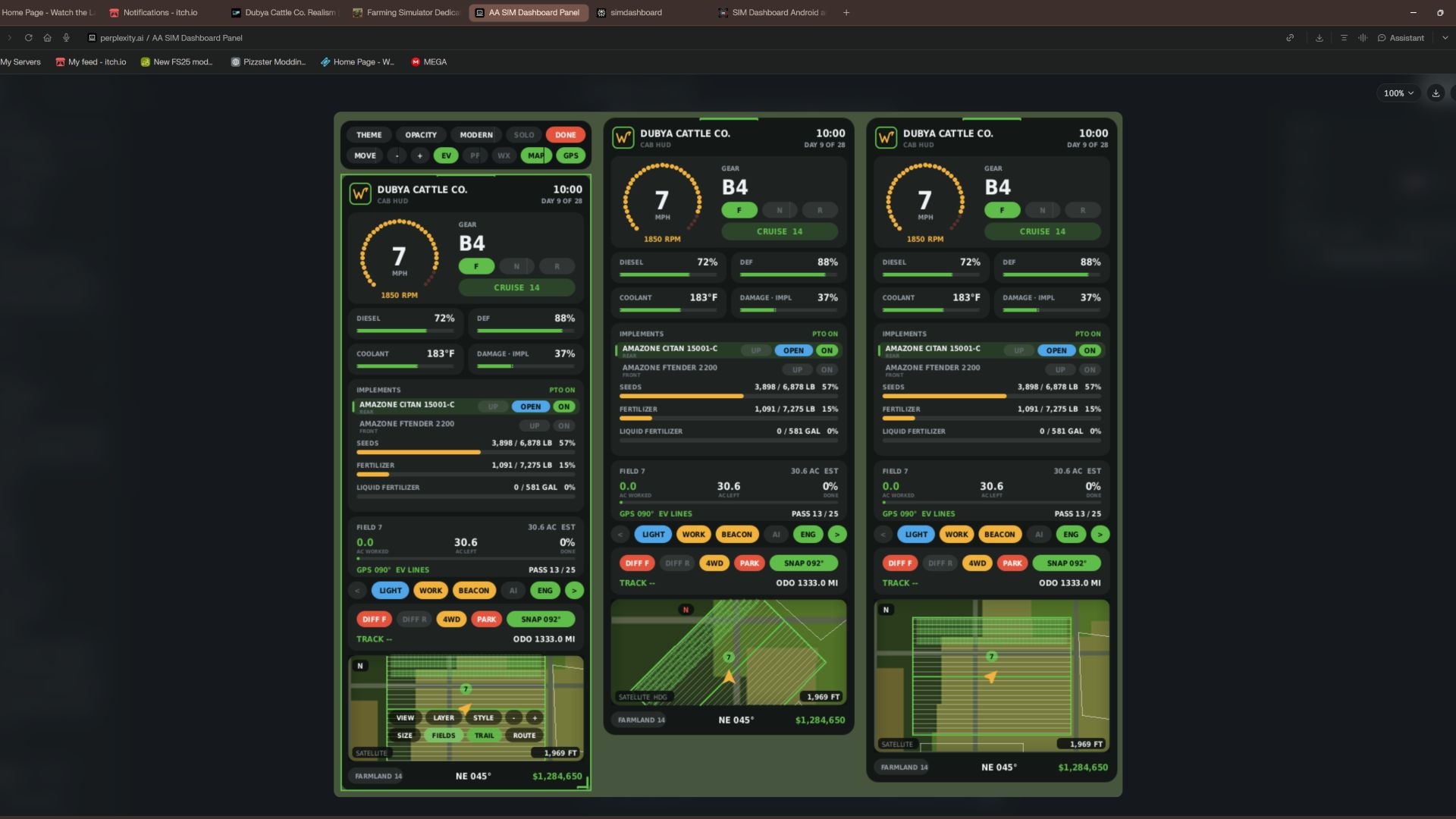
What the panel shows
Header
Dubya Cattle Co. logo
In-game day of the month and the time of day
Driving and engine
Speed (MPH) and engine RPM, with bar gauges
Direction (Forward / Neutral / Reverse), current gear, and cruise control speed
Diesel (or electric / methane), DEF level, coolant temperature in °F, and damage
Damage works like the game's repair bar: it shows the worst damage across the tractor and everything attached, labeled "DMG IMPL" when an implement is the worst one
Implements (like the game's control group HUD)
Every attached implement, including ones hooked to other implements, listed with front or rear position
The selected implement is highlighted
Each implement shows whether it's raised or lowered, folded or open (for implements that fold), and turned on
PTO on/off
Acres worked and left
Shows the field you're working, its size in acres, acres worked, acres left, and percent done, with a progress bar
In single player or when you host, it counts the exact area your implements process, so overlap isn't counted twice
On a dedicated server it estimates from working width and distance, marked EST
Each field and implement set gets its own counter, so a new job on the same field starts at zero
Fill tanks
Every tank across the tractor and implements, up to 4: for example seed and fertilizer on a seeder, or a front tank
Each tank shows its fill type, amount, capacity, and percentage with its own bar; empty tanks are named after what they hold
Bars turn amber at 20% and red at 10%
Lights and status
Indicators for turn signals, headlights, work lights, beacon, AI helper, and engine on/off
Enhanced Vehicle support (optional)
If you run the Enhanced Vehicle mod, an extra section shows:
Front and rear diff locks, 2WD / 4WD / FWD mode, and park brake
Steering snap angle, track number, work width, and headland distance
Odometer and trip meter
Precision Farming support (optional)
If Precision Farming is installed, the panel shows:
The soil type under your tractor
Sprayers and spreaders: pH or nitrogen, current and target value, application rate, and auto / manual mode (amber means you're still under target)
Seeders: seed rate, auto / manual mode, and tramline width
Combines: yield in t/ha and the percentage of yield potential
Mini map
Three views (Right Ctrl + Y): 2D north up, 2D heading up (the map turns with you and a red N shows where north is), and a live 3D chase view from above and behind the tractor
North-up map of your farm, using your map's own overview image, with an arrow showing your heading
4 zoom levels: 300 m, 600 m, 1.2 km, 2.4 km across
Field layers, using the same colors as the game's map menu, with a legend:
Field Work: plowed, cultivated, stubble tillage, seedbed
Crops: growing, ready to harvest, harvested, withered
Fertilized: fertilizer levels (replaced by PF Nitrogen when Precision Farming is installed)
Needs Work: needs lime, plowing, or rolling
Weeds: weeds and stones
Precision Farming: soil types, pH, nitrogen, yield, and seed rate
Layers refresh every 15 seconds, so fresh work shows up as you go
5 map styles: Standard, Satellite, Topo (with grid), Dark, and Night
Weather forecast
Today plus the next 4 days
Weather icon for each day (the worst weather expected during working hours)
High and low temperatures in your game's °F or °C setting
Rain, storm, hail, and snow days highlighted in amber
Footer
Farmland number, compass heading in degrees, and your farm's money
Customization
Modern layout (default): rounded cards, an arc-style RPM gauge around the speed readout, slim pill gauges and pill-shaped buttons. The original Classic layout is one key press away.
Move the panel to preset screen positions, or drag it anywhere with the mouse
Resize it with hotkeys, or drag the bottom-right corner
10 color themes plus a custom theme you can set in the settings file
Adjustable background opacity
Turn each section on or off: Enhanced Vehicle, Precision Farming, map, forecast
Solo mode hides the game's own HUD and keeps only this panel, for a clean cinematic cab view. Enhanced Vehicle's guide lines and track numbers stay visible. The game HUD comes back when you get out of the vehicle.
All settings save automatically to modSettings/FS25_DubyaHUD.xml
Controls
Every key uses Right Ctrl, and all of them can be changed in Options → Controls under "Dubya HUD".
Keys Action
Right Ctrl + H Show / hide the panel
Right Ctrl + J Move to next screen position
Right Ctrl + K Smaller
Right Ctrl + L Bigger
Right Ctrl + C Next color theme
Right Ctrl + B Background opacity
Right Ctrl + O Solo mode (hide game HUD)
Right Ctrl + E Show / hide Enhanced Vehicle info
Right Ctrl + P Show / hide Precision Farming info
Right Ctrl + F Show / hide weather forecast
Right Ctrl + M Show / hide mini map
Right Ctrl + N Map zoom
Right Ctrl + G Map layer
Right Ctrl + V Map style
Right Ctrl + U Panel layout (modern / classic)
Right Ctrl + Y Map view (2D north up / 2D heading up / 3D)
Mouse: when the cursor is showing, drag the panel's header to move it and its bottom-right corner to resize it.
Installation
Put FS25_DubyaHUD.zip in your mods folder (Documents\My Games\FarmingSimulator2025\mods). Don't unzip it, and keep the file name exactly as is.
Enable the mod when you load or create your save.
For a dedicated server, upload the same zip to the server's mods folder and enable it there.
Get in any vehicle. The panel appears automatically.
Compatibility
Works on its own. Enhanced Vehicle and Precision Farming are optional; their sections only appear when those mods are active.
Other mods' HUDs, such as AutoDrive or Courseplay, aren't hidden by solo mode.
If something isn't working, check log.txt for lines starting with "DubyaHUD".
v2.2.0.0
Eklendi
- Otomatik harita katmanı: Bir tarlaya girdiğinizde, harita o anki işleme uygun katmana geçer
- Pulluk, kültivatör, diskli tırmık, dip patlatan, silindir, malçlayıcı, taş toplayıcı veya mibzer: Tarla İşi (Field Work)
- Gübre, sıvı gübre, bulamaç, çiftlik gübresi veya biyogaz atığı (digestate): PF Azot (Precision Farming olmadan "Gübrelenmiş" olarak görünür)
- Kireç: PF pH (Precision Farming olmadan "İşlem Gerektiriyor" olarak görünür)
- Herbisit (ot ilacı) veya çapa makinesi: Yabani Otlar
- Biçerdöver: PF Verim (Precision Farming olmadan "Mahsuller" olarak görünür); çayır biçme makinesi veya balya makinesi: Mahsuller
- İlaçlama ve gübreleme makineleri; tanklarının içinde ne olduğuna, en son ne konulduğuna veya ön tanktan ne beslendiğine göre algılanır
- Manuel olarak seçtiğiniz bir katman, yapılan iş değişene veya başka bir tarlaya girene kadar sabit kalır
- Etkileşim modundaki "AUTO" (Otomatik) harita düğmesi, otomatik katman özelliğini açıp kapatmanızı sağlar
Kaldırıldı
- Kapsama izi (çizim, kaydetme ve buna ait harita düğmesi); daha önceden kaydedilmiş iz verileri artık dikkate alınmaz
---
v2.1.0.0
Eklendi
- GPS rotası, oyunun kendi GPS sistemini (Direksiyon Asistanı - Steering Assist) kullanır; böylece GPS hatları, "Enhanced Vehicle" moduna gerek kalmadan çalışır
- Bir tarlaya girdiğinizde araç otomatik olarak Direksiyon Asistanı moduna geçer; oyun, tarlayı zemin üzerinden algılar, rotayı oluşturur ve hatları oyun dünyasında görüntüler
- Tarladan çıktıktan yaklaşık 8 saniye sonra, araçtan indiğinizde veya başka bir araca geçtiğinizde, önceki yapay zeka (AI) modunuz geri döner
- HUD haritası, oyunun oluşturduğu hatları gösterir ve o an üzerinde bulunduğunuz hattı vurgular Arazi kartı, LINE x / y bilgisini gösterir
- GPS araç çubuğu düğmesindeki GPS modları: AUTO (Otomatik), GAME (Oyun), EV (Enhanced Vehicle), OFF (Kapalı)
- Kaydedilen arazi çalışmaları: İşlenen dönüm miktarları, her kayıt dosyasında (çok oyunculu modda sunucu bazlı olarak), 30 saniyede bir, oyun kaydedildiğinde ve oyundan çıkıldığında saklanır
- Daha önce tamamlanmış arazilerde sonraki günlerde yeniden çalışmaya başlandığında, süreç bir sonraki sezon için otomatik olarak sıfırlanır
- Etkileşim modundayken arazi kartı üzerinde bulunan RESET (Sıfırla) düğmesi (onaylamak için iki kez tıklayın)
---
v2.0.0.0
Eklendi
- Etkileşim modu (Sağ Ctrl + X): Fare imleci görünür, kamera fareyi takip etmeyi bırakır, tıklanabilir arayüz (HUD) öğeleri aktifleşir
- Işıklar, çalışma ışıkları, tepe lambası, sinyaller ve motor kontrolleri
- Ekipman seçimi; ekipmanı kaldırma/indirme, katlama/açma ve çalıştırma işlemleri
- Enhanced Vehicle (Gelişmiş Araç) özellikleri: diferansiyel kilitleri, 4 çeker (4WD), el freni, hat sabitleme (snap) ve kilometre/yol sayacı
- Harita üzerinde; görünüm, katman, stil, yakınlaştırma, boyut, arazi sınırları ve rota seçenekleri; fare tekerleği ile haritayı yakınlaştırma/uzaklaştırma imkanı
- Tema, opaklık, düzen, tek kişilik mod, taşıma, boyutlandırma; ayrıca EV, PF (Precision Farming), hava durumu tahmini, harita ve GPS gösterimlerini yönetmek için araç çubuğu
- Başlık kısmından sürükleyerek taşıma, köşelerden sürükleyerek boyutlandırma
- Moddan çıkış: Sağ Ctrl + X tuşlarıyla, "DONE" (Bitti) düğmesine tıklayarak veya araçtan inerek
- Bir araziye girildiğinde otomatik GPS rotası oluşturma: Arazinin en uzun düz kenarını takip eder; ilk geçiş, çalışma genişliğinin yarısı kadar içeriden başlar
- Enhanced Vehicle yüklüyse, onun iz çizgilerini (track lines) aktif hale getirir; arayüzdeki harita, Enhanced Vehicle üzerinde yapılan değişiklikleri yansıtır
- Arazi kartı, rota yönünü ve geçiş numarasını gösterir
- Sağ Ctrl + R tuşları ile rota yeniden hesaplanır
- Harita geliştirmeleri
- Arazi sınırları ve numaraları; bulunulan arazi vurgulanır
- Üç farklı harita boyutu seçeneği (Sağ Ctrl + T)
- "Heading-up" (yön odaklı) görünümde, araç okunuz daha aşağıda konumlandırılarak önünüzü daha geniş görmeniz sağlanır
- Sınırlar yalnızca o an görüntülenen alanlar için çizilir
Değişiklikler
- Önceki tüm tuş atamaları korunmuştur
---
v1.9.0.0
Değişiklikler
- Oyunun birim ayarı ne olursa olsun, her yerde İngiliz ölçü birimleri (Imperial units) kullanılır
- Sıvılar için galon birimi kullanılır; - Tahıl miktarı (USDA standart bushel ağırlıkları) kile cinsinden; diğer her şey pound cinsinden
- Hız ve seyir hızı mil/saat cinsinden; soğutma sıvısı ve hava tahmini °F cinsinden
- İşleme genişliği, tarla başı, tramvay hatları ve harita ölçeği fit cinsinden; kilometre sayacı ve yolculuk mesafesi mil cinsinden
- Hassas Tarım oranları lb/acre veya gal/acre cinsinden; tohum oranı lb/acre veya tohum/acre cinsinden; azot lb/acre cinsinden
- Biçerdöver verimi tahıl için bu/acre, diğer ürünler için lb/acre cinsinden