
FarmTablet - A Complete Farm Management Tablet for Farming Simulator 25
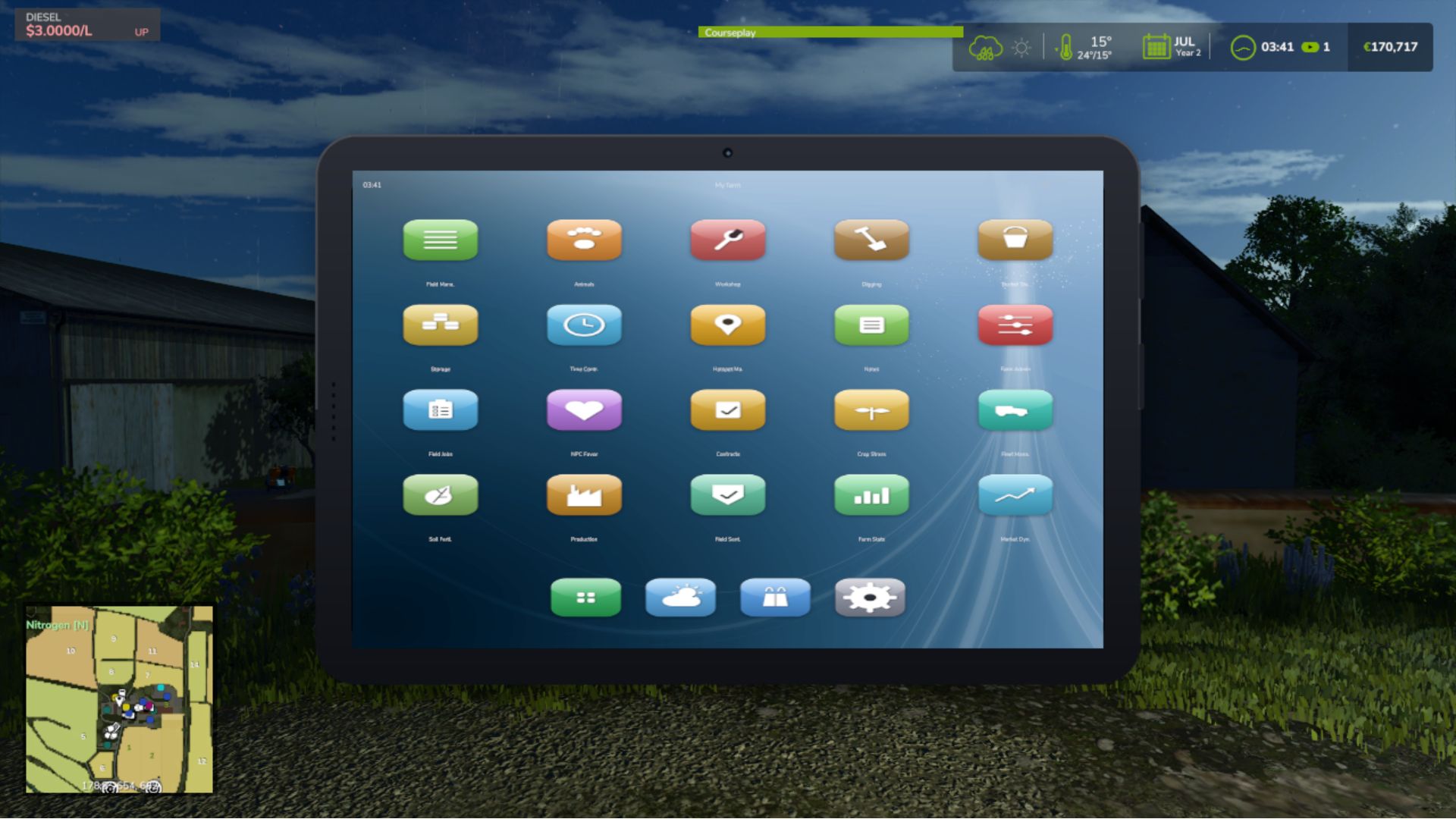
Open it with one key and your whole farm is right there. A phone-style tablet with a lock screen, a home screen full of glossy app icons, a dock for your favourites, and as many pages of apps as you need. Tap an app, check what you need, tap home, and get back in the cab. No pausing, no menus stacked four deep, no alt-tabbing to a spreadsheet.
✨ Features
- Phone-Style Tablet UI
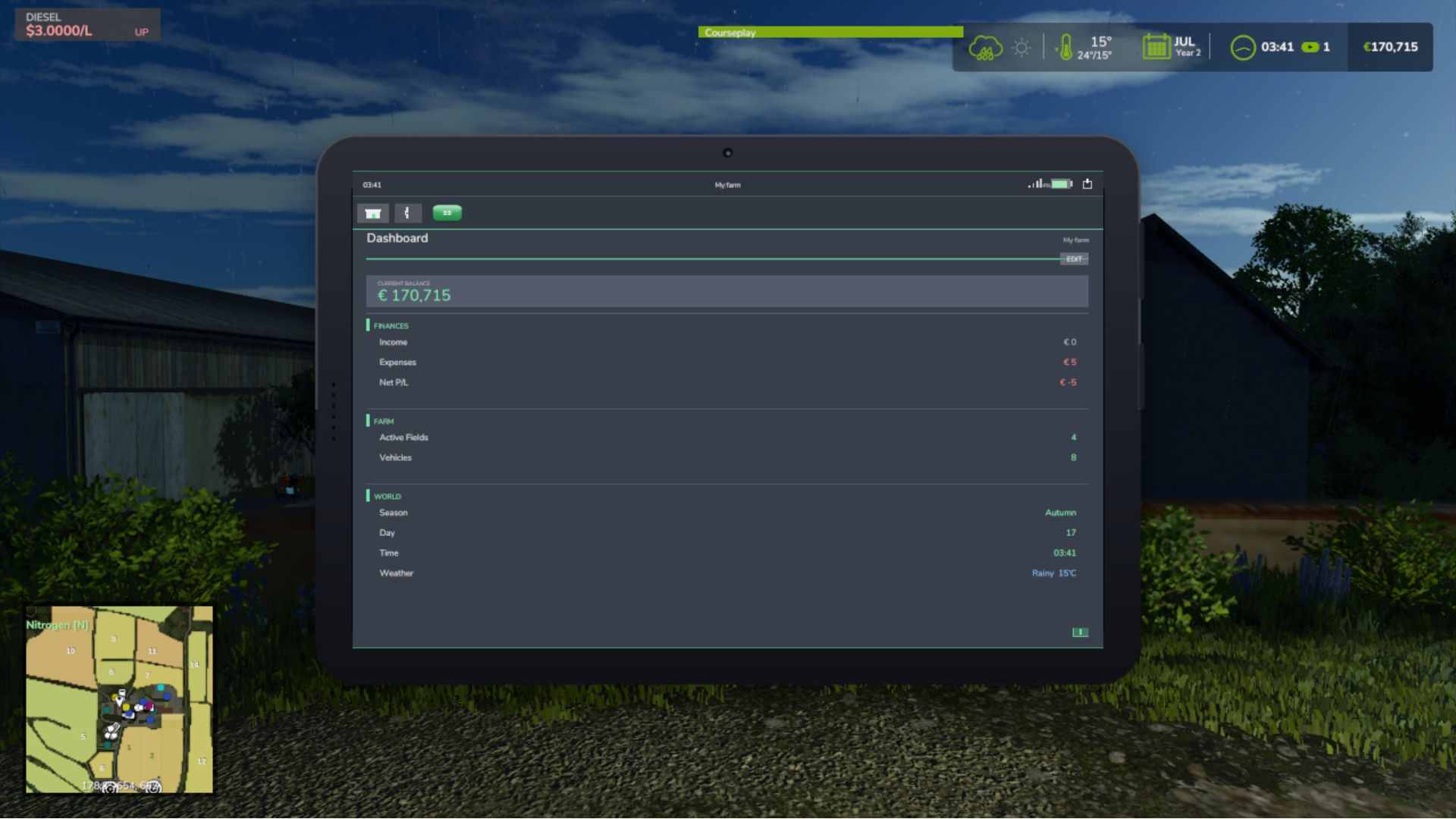
- Farm Dashboard & Stats
- Fields, Animals & Fleet
- Workshop & Storage
- Production & Contracts
- Auto-Detecting Mod Apps
- Fully Customizable
- Multiplayer & 26 Languages
🎮 Controls
- Open / close the tablet: T
- Everything else is tap and click, just like a real tablet
Note that the tablet only reads your game data and never changes your save, and any supported mod's app shows up on its own with no setup or load order to worry about!
Integrates automatically with: NPC Favor, Soil Fertilizer, Field Sentry, Seasonal Crop Stress, Income Mod, Tax Mod, Market Dynamics, Worker Costs, Personnel (Pro-Staff), Random World Events, UsedPlus, and Invoices (with RoleplayPhone).
===================================================================
GitHub Repository:
https://github.com/Realistic-Farming/FS25_FarmTablet
===================================================================
COPYRIGHT NOTICE:
All rights reserved. Unauthorized redistribution, copying,
modification, or claiming this mod as your own is strictly prohibited.
Original Author: TisonK
===================================================================
Added
- A Tablet Charging Station placeable.
- Editable System Settings app: change suite settings from the tablet through Settings Hub. Enum settings show their chosen value, and a group opens on the first tap.
- Emergency loan in the Financial Cockpit (with Income Mod).
- Irrigation Suite shows rain-key state and hours of water, and replaces the old Crop Stress app (the App Store's Seasonal Crop Stress row points to it, and old saves are redirected). In multiplayer it shows only your own farm's irrigation.
- Dairy app: herd and tank breed records for your farm. Organic app: a compost display and a livestock section, with barns shown by name.
- Soil app: with Soil & Fertilizer's experimental AUTO target on, field cards show the crop window, the soil reading where you stand, the last AUTO pass and any pause (including a field with no growing crop).
- Owned-field lists are grouped by the helper's GPS outline. Control Center actions for the tablet.
Fixed
- The whole tablet speaks your language: the home and lock screens, app names, App Store, Dashboard, Settings and every app (Field Status, FieldSentry, Rotation Planner, Animal Husbandry, Contracts, Fleet Manager, Farm Stats, Production, Storage, Workshop, Weather, Hotspots, Notes, Excavator, Farm Admin, Personnel, Organic, Soil, Updates, Invoices, Income, Tax, Worker Costs, NPC Favor, Pro Staff, the Financial Cockpit, the Irrigation Suite and the Akita apps) are translated into every language the game ships.
- Garbled letters and symbols in Danish, English, Indonesian, Italian, Dutch and Turkish are fixed. German and Russian players read the tablet's own translations instead of words rewritten inside other words. Long names no longer end in a broken letter, and text already in your language is drawn as it is (clocks read "06:30").
- Farm Admin's money buttons show your own currency, and Farm Admin works on dedicated servers. The force-repair fee is charged on the server, and the weather dial says when a change is refused instead of doing nothing.
- Market Movers no longer scales a per-head livestock price by 1,000. The Akita apps agree with their own data, and the helps only name what the companion mods really have.
- The tablet stays visible when Master HUD hides the suite HUDs. The Contracts tab survives missions with a broken field wrapper, the Field Jobs timer and controls are explained where you press Start, and the irrigation forecast never reads a missing moisture as 0.
- The tablet shows the installed build's own version, the excavator icon is back, settings save on dedicated servers, and the help pages' Back control sits clear of the first section.
(v2.5.2.15)
New
- System Settings app. Adjust the settings for every connected Realistic Farming mod from one place on the tablet, with a scrollable, collapsible layout so a big farm setup stays tidy.
- Market Dynamics app. Check live market prices and dynamic events from the tablet.
- Random World Events app. See the active world event and what it is affecting.
- Tablet battery, mobile network and screen damage, built together with Akita83. The tablet now charges, has signal, and can crack, for a more real handheld feel.
- Full 26-language localization. Battery, network and companion app text is now translated across all supported languages.
Improved
- Clearer navigation and rendering across the springboard, lock screen and app chrome.
Fixed
- App focus could leak between the springboard and lock screen. Focus is now derived centrally so the right app always has control.
- A listener leak on tablet reload is cleared on unload, so reopening a save stays clean.
[ What's new ]
- Favourites page: tap the star (in the app bar or on the home screen) to see just your starred apps. The star glows gold when it is open, and EDIT lets you pick which apps to keep. Saved per savegame.
- Clearer app bar: a little house for Home and a real left arrow for Back. Back steps up one level (it leaves a sub-page first) before going home.
- Customise app icon labels in Settings: show or hide them, and change the size and colour.
[ Fixed ]
- Status bar (signal, battery, power), dock and home indicator now render on the home and lock screens.
- App icon textures are now mipmapped DDS, clearing most of the texture warnings in log.txt.
- Worker Costs roster scrolls past the first 5 staff.
BIG UPDATE!!
The Farm Tablet is now a real tablet :)
New:
- Lock screen with slide to unlock, opening to a home springboard (a paged grid of app icons plus a dock)
- Real glossy icons for every app and integration
- Tap an app to launch it full screen with a zoom animation; every icon presses in when touched
- Status bar with a live clock, battery and signal; tap the power icon to lock
- Apps open full screen with a Home and Back bar
- Rounded 3D tablet frame, screen gloss and a wallpaper
- Custom home background: drop a PNG into the FTBackground folder in your savegame and pick it in Settings
Notes:
- Press T to open the tablet, then slide to unlock.
A two-part update focused on integration.
[ FieldSentry app ]
A new app that surfaces Soil & Fertilizer's FieldSentry right on the tablet. For every field you own it shows whether the soil sim is active, asleep (your choice), under an NPC contract, or decorative — and lets you toggle a field to Sleep or mark it a Meadow without diving into console commands. Admin-gated and validated by the host in multiplayer, read-only for non-admins, and it appears automatically when a FieldSentry-capable Soil & Fertilizer build is installed.
[ Tablet Focus State API ]
The tablet now publishes its on-screen state on g_currentMission.farmTablet (whether it is visible, and which app is active), with an event other mods can subscribe to. Worker Costs uses it so its Pro-Staff panel steps aside when the tablet is open, instead of two overlays fighting. This is the proper, FS25-native home for what was the old browser-tab idea.
Pair this with the matching Soil & Fertilizer and Worker Costs releases. As always, back up your save and shout on the tracker if anything looks off.
- Paging arrows and toggles (Notes field/template pickers and the rest) now respond instantly. Before, the content only refreshed on a 4 second timer, so a click could take up to 4 seconds to show.
- The Production app no longer says 'stalled' while a production is actually running. It now counts the productions you have switched on instead of reading a field that was always empty.
- The Soil app now shows N/P/K in ppm, so the numbers line up with the Soil Fertilizer HUD instead of showing the raw internal value.
- The 'DESEL' button looked like a misspelled 'diesel' sitting next to the fuel bar. It is now 'UNPIN' in the Workshop and Income apps. (The 0% fuel reading was already fixed in 2.3.2.2.)
- Settings page: sound toggle readability, stale right-click tip removed, duplicate ABOUT section removed, GitHub links added to INFO section
- Weather page fixes
- Floating header fixed across all scrollable pages
- Workshop page fixes
- Fleet page fixes
- Field Manager page fixes
#72 — Production page fixes
#73 — Soil page fixes
BUG FIXES
- Scrolling was backwards on all scrollable pages (Settings, Storage, App Store,
Field Manager, etc.) — wheel up now correctly reveals content toward the top
- Scrolling the mouse wheel while the tablet was open also zoomed the game camera
in/out — the tablet now fully captures scroll events so the camera is unaffected
- Sidebar app list scroll direction was inverted — wheel up now scrolls toward
later apps as expected
- Section header text (green labels like CONDITIONS, FORECAST, STATUS) was being
overlapped by the horizontal separator lines on every app page — spacing
corrected so there is always clear room between dividers and section titles
- Settings page would snap back to the top while scrolling — the scrollable
content height calculation was incorrect; now fixed so you can scroll freely
to the bottom
- Storage page section headers were overlapping the fixed app header when
scrolling down — a cover strip is now drawn to keep the header clean
- App names were showing as "Missing 'ft_ui_app_...' in l10n_en.xml" in the
top bar and App Store — translations were not included in the mod package;
now fixed, all app names display correctly
- EXIT EDIT MODE button was not responding to clicks while in tablet edit mode
— drag detection was intercepting the click before it reached the button
- Exiting edit mode hid the mouse cursor while the tablet was still open,
making the tablet unusable without closing and reopening it
- Version number displayed in the tablet was incorrect (showed 2.3.0.0 instead
of the correct version)
- Digging app showed the wrong elevation (far below ground) when the player
was sitting inside a vehicle — it now uses the vehicle's position instead
of the player node inside the cabin
- Field Manager and Field Jobs pages showed incorrect crop status — "Ready to
harvest" detection was hardcoded to growth stage 7, which is wrong for many
crops. It now uses each crop's actual harvest threshold from the game data
- Weather app condition indicator displayed cryptic symbols ([**], [~~], [!!])
that are not in the game font — replaced with readable labels: CLEAR, RAIN,
STORM, FOG, OVC, CLOUD
- Weather app condition label was drawn at a font size too large for the hero
card, causing it to collide with the temperature value — size corrected
- Income Mod and Tax Mod ENABLE / DISABLE buttons had inverted highlight logic
— the current active state is now highlighted (green = enabled, red = disabled)
- Workshop page subtitle incorrectly labelled nearby vehicles as "near" shops
— now clearly shows "N shops | N vehicles nearby"
Thank you to everyone who reported issues — keep the feedback coming!
- New: Danish translations added for the mod title, mod description, and the tablet toggle keybind. Thanks to DJWestDK!
- Fixed: Digging App terrain height was reading incorrectly due to a wrong argument order in the terrain API call. Ground elevation now displays accurately.
The tablet key now works correctly after rebinding in the FS25 controls
menu. Previously the mod only registered the keybind once at startup and
never picked up changes — this is now fully fixed.
What's new / fixed:
- Fixed: rebinding the tablet key (default T) in the FS25 controls menu
now takes effect immediately — the new key works on foot, in vehicles,
and after any context switch
- The tablet toggle action now appears in the FS25 controls menu under
its own entry (FT_TOGGLE_TABLET) and can be rebound like any other
game action
- Fixed: a crash on load caused by a corrupted internal file — in some
cases the tablet would fail to register its console commands silently
- French translation improved with native translations from community
contributor Seb — app names and help text that were showing in English
are now fully translated
Saves: No migration needed.
Three new apps have been added alongside a handful of fixes that have been building up since v2.2.0.0. Whether you're managing a large fleet, running production chains, or just want a quick snapshot of how your farm is doing financially, this update adds a dedicated screen for each.
What's new:
- Fleet Manager app — lists every vehicle you own, sorted by fuel level so the emptiest machines are always at the top. Each entry shows a fuel bar, wear bar, and total operating hours. Vehicles driven by a hired worker are flagged with an AI badge.
- Production app — shows every production building you own (cheese factory, bakery, sawmill, etc.) with its current active/stalled status and the ingredients it needs and what it makes.
- Farm Stats app — one screen for your full farm picture: current balance, loan, and net worth; session income and expenses; field count and total hectares owned; vehicle, animal pen, and production building counts; plus current day, season, and time.
- App Store fix — the Mod Integrations section now always shows all supported companion mods. Previously, if a mod wasn't installed it simply didn't appear, leaving the list looking empty. Uninstalled mods now show dimmed with a note on which mod to install.
What's fixed:
- Farm Admin and Time Controls apps now work correctly in multiplayer (non-host players no longer see errors when opening them).
- Mouse input handling has been rewritten to use the proper FS25 event system — this fixes rare conflicts with other mods that also handle mouse clicks.
- Crop Stress app moisture data was reading from the wrong field in some situations — corrected.
- Soil health data is now shown correctly in the Crop Stress and Soil Fertilizer drawers.
- Dashboard widget customisation: you can now toggle individual dashboard sections on and off to show only what matters to you.
- Contracts app added in a previous patch — lists your active contracts with completion status, reward, and time remaining.
Save compatibility: no migration needed. Load your existing save and everything carries over automatically.
Previously, five apps would silently truncate their content when your farm grew large enough to overflow the screen. The Field Manager showed a "... N more fields" hint but offered no way to see them. Storage, Workshop, UsedPlus and Invoices cut off rows without any indication. This release wires all five into the existing scroll system — the same mouse-wheel + scrollbar that already works in Animals, Field Jobs, Income and others.
What changed:
Field Manager — all owned fields are now reachable via scroll; the truncation hint is removed
Storage — Inventory, Best Sell Prices and Price Comparison all scroll together as one page; no more cut-off crop lists on large farms
Workshop — the 6-vehicle nearby cap is lifted; all vehicles within 35 m appear and the Repair button is always reachable
UsedPlus — sale listings and finance deals scroll correctly when you have many active entries
Invoices — incoming and outgoing invoice lists scroll on large roleplay economies
No behaviour changes for small farms — the scrollbar only appears when content actually overflows the screen, so the UI stays clean when there is nothing to scroll.
New: Storage App (STR)
* Inventory — aggregates fill levels across all owned silos (grain silos, bunker silos, silage pits, manure stores). Sorted by amount.
* Best Sell Prices — shows the best current price per stored crop across all active selling stations on the map. Prices per 1,000 L, refreshed every 5 seconds.
New: Invoices App (INV)
* Full in-tablet invoice management: create, pay, cancel, and delete invoices
* * NEW button in the bottom chrome strip (no longer clipping into rows)
* PAY and CANCEL action buttons on active invoice rows
* DELETE button on paid invoice rows only
* Invoice creation form with crop/category cycler — no base game dialog required
* Built-in FT_InvoiceManager; foundation for FS25_RoleplayPhone integration
Bug Fixes:
* Camera rotation no longer bleeds through while tablet is open
* Fixed income mod detection across cross-mod environments
* WorkshopApp and FieldStatusApp — correct FS25 API usage for vehicle/field ownership
* Invoice row text centering fixed (bottom-anchor y convention)
The income and expenses on the Dashboard were always showing $0 due to a bad assumption about how FS25 tracks money internally. That's now fixed.
Also new: a dedicated UsedPlus app for players who use the used equipment marketplace mod.
What's fixed:
- Dashboard "Income" and "Expenses" now correctly track money earned and spent during your session — selling crops, buying equipment, AI worker wages, loan payments, contractor pay, and anything else that changes your balance all count
What's new:
- UsedPlus app (appears in the sidebar automatically if UsedPlus is installed): shows your active vehicle sale listings with asking price range, agent tier, time remaining, and a progress bar — plus any active finance deals and your credit score
- Missing sidebar labels added for Market Dynamics, Worker Costs, and Random World Events apps
Saves: No migration needed. Finance numbers start from zero each session (income/expenses are session-relative, not all-time totals).
- Repair cross-mod detection for NPC Favor, Soil Fertilizer, Seasonal Crop Stress apps
- Added Market Dynamics integration app (active events, price/event toggles, frequency)
- Added Worker Costs integration app (wage level, cost mode, active workers, monthly accrual)
- Added Random World Events integration app (active event, frequency, intensity, counter)
- Bumped version to 2.1.4.0
New:
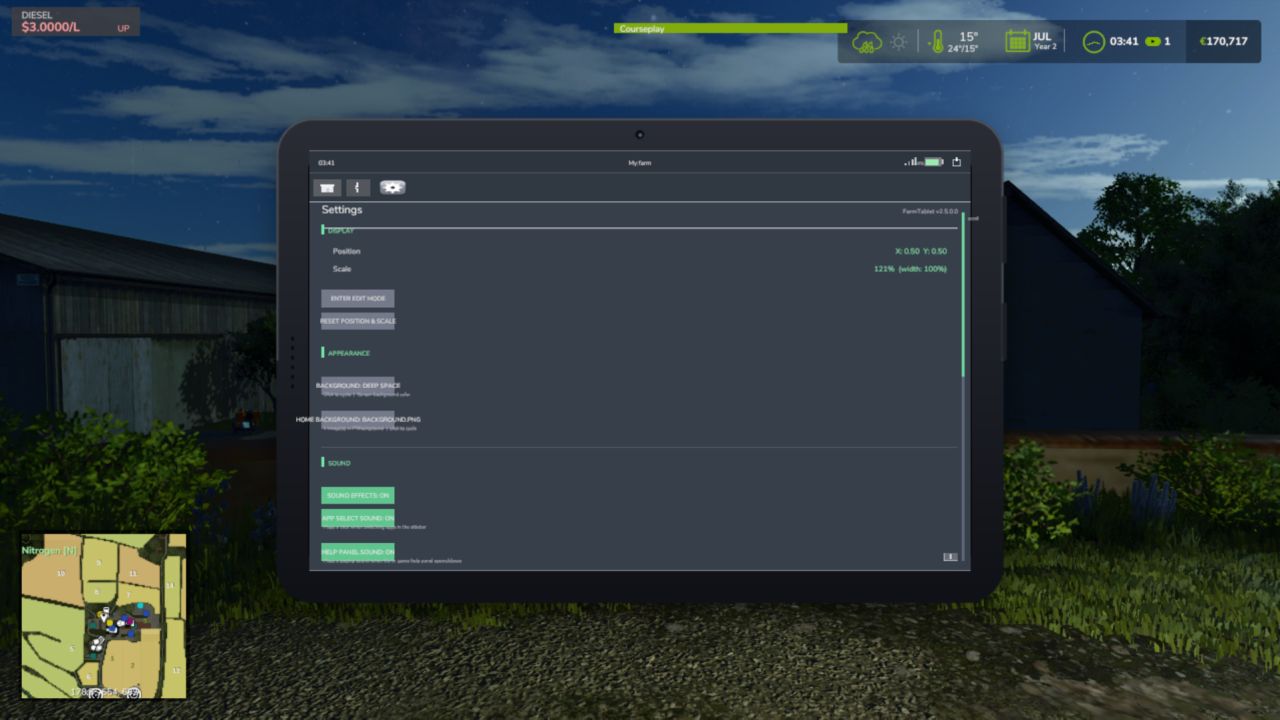
- Settings app now has an APPEARANCE section — click BACKGROUND to cycle through 6 built-in dark themes for the tablet screen: Deep Space, Ocean Blue, Forest Green, Midnight Purple, Warm Dark, Slate Grey. Your choice is save between sessions.
Fixed:
- Critical: the translations folder was missing from the mod zip. This caused every app name in the App Store to display as a raw missing-key error instead of the correct label (Dashboard, Weather, etc.).
- Pause menu → Settings → Farm Tablet section was showing raw internal key names instead of readable labels. All settings labels now display correctly.
Hey farmers,
With this update, FarmTablet has gone through another round of polish. What we have now feels much closer to an actual tablet experience than what we built before.
If you would like to see a custom app or have ideas for new features — like an invoice system for example — please open an issue on GitHub with your suggestions. And of course, if you run into any bugs or problems, report those there too.
Changes in this update:
- Improved app name translation keys in AppRegistry
- Removed broken texture atlas causing overlay warnings on every tablet open
- Improved mod detection to correctly read cross-mod globals in autoDetect()
- Updated the Updates app with the latest changelogs
- Added translation for 26 languages
- Added info icon per app (bottom right corner)
- Added help section to pausemenu
- Added multplayer support
- Added dedicated server support
- Fixed: All UI sounds were silently broken due to an internal field name mismatch. App-select clicks, help panel sounds, and other audio interactions now work correctly.
- Fixed: Opening and closing the tablet produced no sound. The tablet now plays an audio cue when opened and when closed.
- New: Tablet open and close sounds can be toggled on or off independently in Settings under Sound.
- New: The Settings page is now scrollable. Use the mouse wheel while hovering over the content area to scroll through all settings sections. A scroll bar shows your current position.
- Improved: Items that scroll outside the visible content zone are now properly hidden and do not bleed past the content border.
* Added scrollwheel support to sidebar using `Input.isMouseButtonPressed` (correct FS25 API)
* Added scrollbar indicator with thumb, track and arrows when apps overflow the sidebar
* Added per-app unique accent colors across sidebar highlight, header divider and topbar tint
* Added power, volume up and volume down hardware buttons to the right bezel
* Added speaker grille detail to the left bezel
* Fixed Workshop not detecting workshop placeables (now scans `spec_workshop` on placeables)
* Fixed Workshop vehicle detection range expanded to 35m
* Fixed Workshop REPAIR button with three fallback strategies including MP-safe `VehicleRepairEvent`
* Fixed Weather pulling wrong rain scale (now probes all known FS25 API variants)
* Fixed Weather wind speed not converting m/s to km/h
* Fixed Weather forecast not normalising condition field names across FS25 versions
* Fixed NPC Favor reading non-existent `.npcs`/`.favorLevels` (now uses `g_NPCSystem.activeNPCs`)
* Fixed NPC Favor relationship being treated as 0–1 float instead of 0–100 integer
* Fixed Soil Fertilizer using wrong global `g_soilFertilizerManager` (correct: `g_SoilFertilityManager`)
* Fixed Soil Fertilizer using non-existent `.soilData`/`.getSoilStatus()` (now uses `:getFieldInfo()`)
* Fixed Crop Stress using wrong global `g_currentMission.cropStressManager` (correct: `g_cropStressManager`)
* Fixed AppRegistry autoDetect using wrong globals for NPC Favor, Crop Stress and Soil Fertilizer
* Improved Weather temperature display with feel label (Freezing/Cold/Cool/Mild/Warm/Hot)
* Improved Weather precipitation with intensity bar
* Improved NPC Favor to show town reputation, active favors, completed count and money earned
* Improved Soil Fertilizer to show per-field N/P/K status, pH, organic matter and needs-fertilizer flag
* Improved Crop Stress to show per-field moisture bar alongside stress percentage
Full changelog -> https://github.com/TheCodingDad-TisonK/FS25_FarmTablet/releases/tag/v1.1.2.0
- Fixed missing env scope for Tax Mod
- Fixed issue with enable/disable buttons for the Tax app
Three new apps, mod detection fixed, and a build that actually loads
The previous version had a silent packaging bug that prevented the mod from loading at all on some systems.
This update fixes that, adds three new apps, and corrects the Income Mod integration that wasn't being detected even when the mod was active.
What's new:
- Vehicle Workshop app — inspect nearby vehicles: fuel level, wear/condition, operating hours, and attached implements
- Field Status app — see field ownership, crop type, and growth stage for fields near you
- Animal Husbandry app — livestock counts, feed status, and productivity for your barns
What's fixed:
- Income Mod now shows up correctly in the tablet when FS25_IncomeMod is installed
- Vehicle Workshop was showing "no vehicles nearby" even when standing next to a tractor — fixed
- Mod failed to load entirely on some installations due to a zip packaging issue — fixed
- UI polish: better layout, cleaner section headers, progress bars, and more consistent colors throughout
No save migration needed. Drop in the new zip and go.
Visual Overhaul & UI Polish
The tablet's information panels were functional but hard to read at a glance — everything looked like a plain text dump. This update cleans up the layout across every app so it's faster to find what you're looking for mid-session.
What's new / What's improved:
- Every app now has a clean divider line under its title — no more content blurring into the header
- Section labels (Finances, Farm, Weather, etc.) now show a small green accent bar on the left for quicker scanning
- Bucket Tracker now shows a color-coded fill bar under the fill percentage — green when full, orange mid-range, red when low
- The content area has a subtle top border giving it a proper card-style look
- NPC Favor, Crop Stress, and Soil Fertilizer app integrations added (auto-detected if the mods are installed)
- Interactive Settings app — toggle notifications, sound effects, and debug logging directly from the tablet
- Several behind-the-scenes bugs fixed: overlay memory leaks on app switch, startup app mapping, cross-mod global references
- Version display in Settings and Changelog apps was showing the wrong number — fixed
Saves: No migration needed. Drop in and play.
Full changelog -> https://github.com/TheCodingDad-TisonK/FS25_FarmTablet/pull/4
- Complete overhaul of the tablet


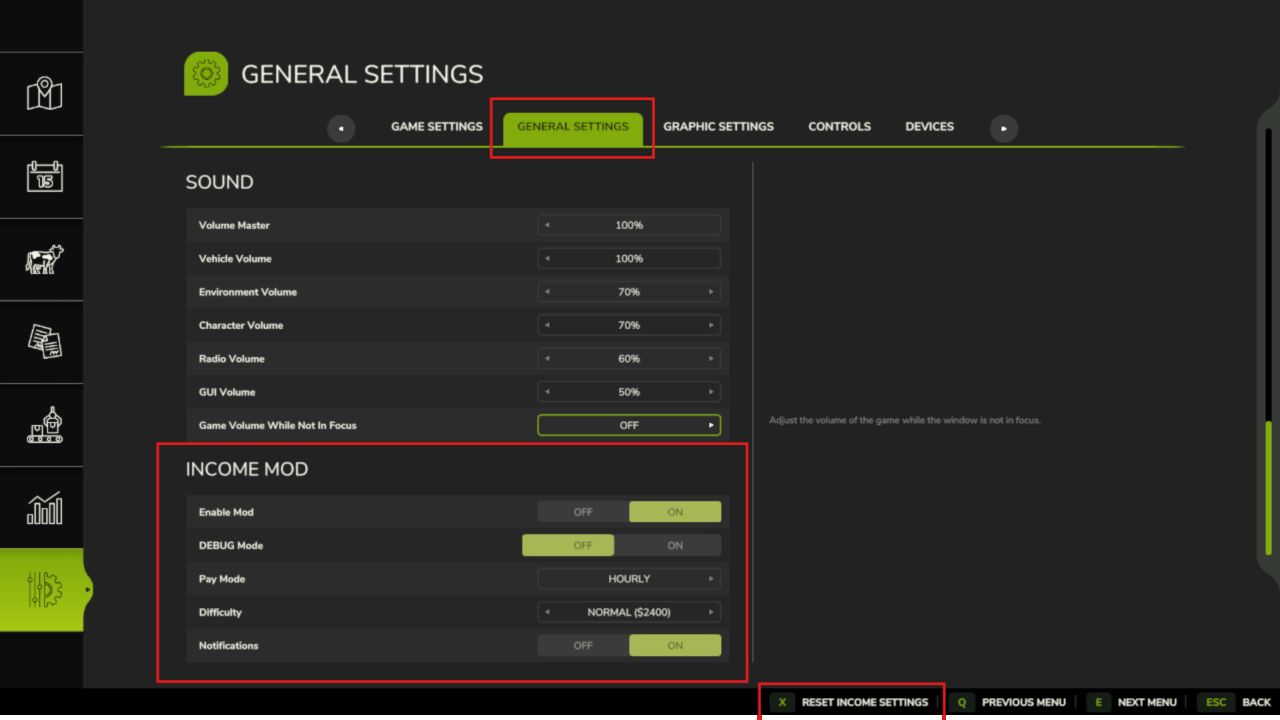 Income Mod
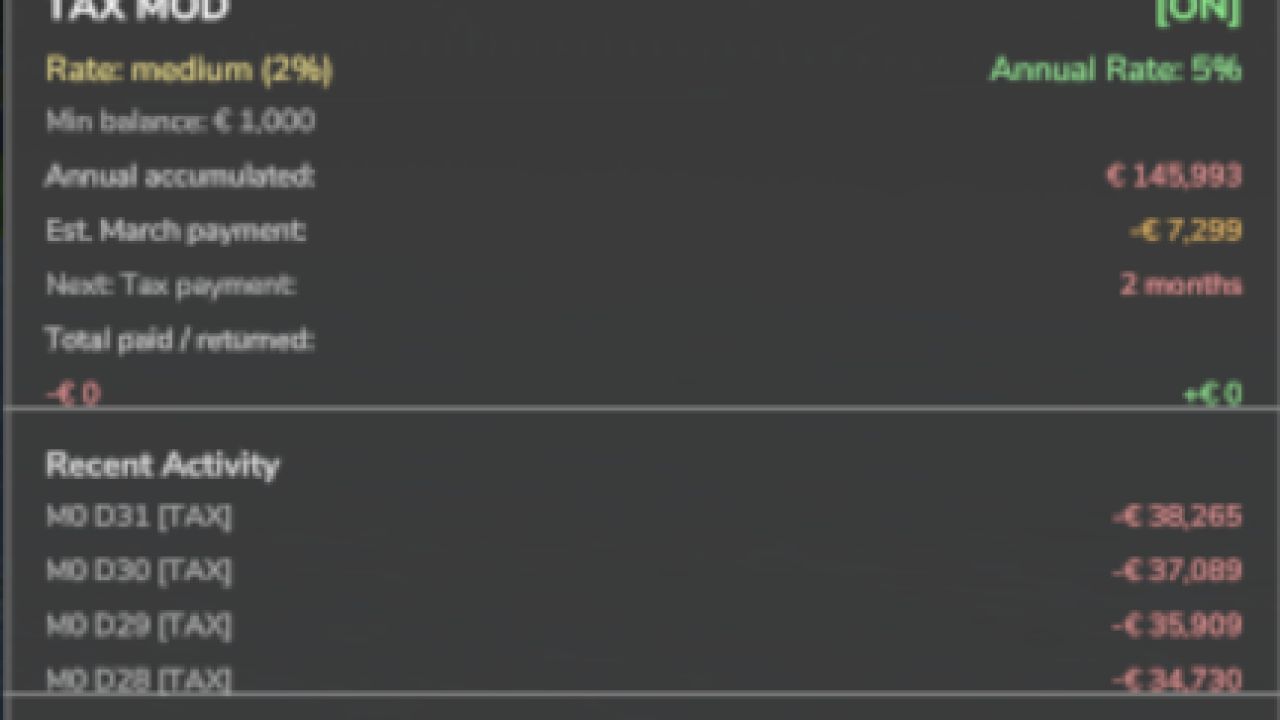 Tax Mod
 NPC Favor
 Realistic Soil & Fertilizer
 Seasonal Crop Stress
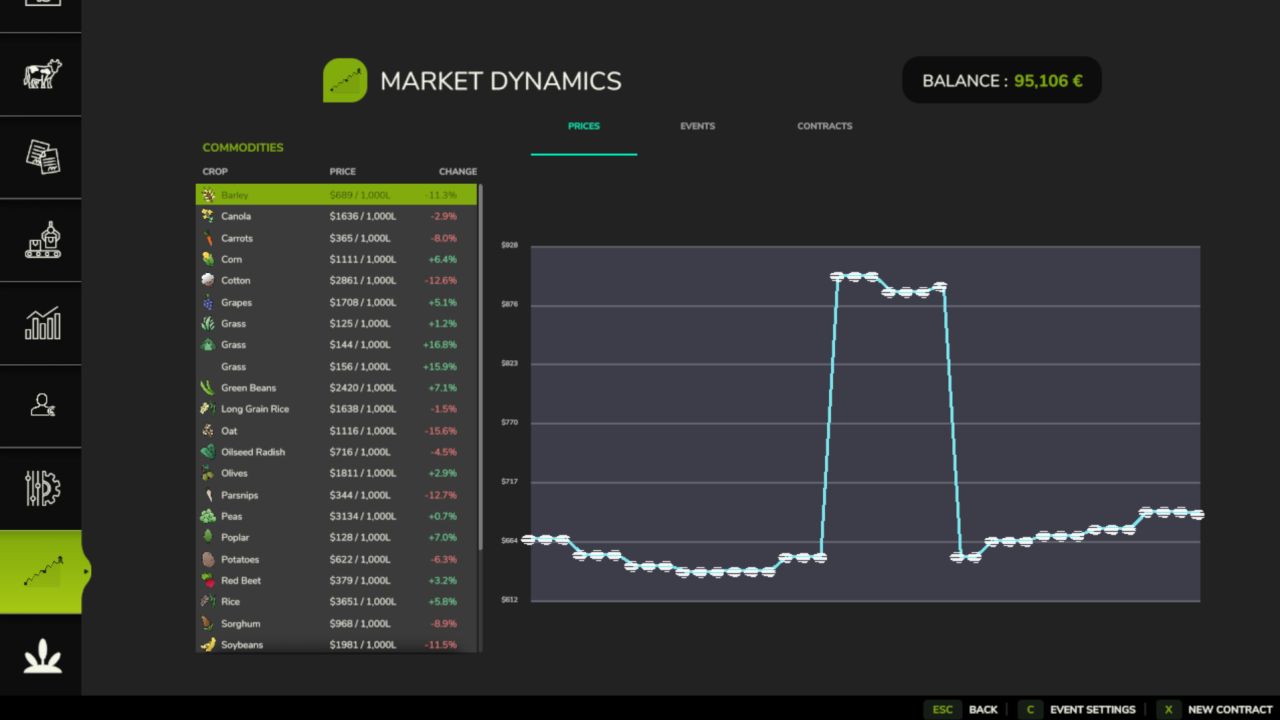 Market Dynamics
 Realistic Worker Costs
 Random World Events
 Network Sync
 State Ledger
 Master HUD
 Settings Hub
 Akita83