Contact me on Discord: @drivepro

Bonjour @DrivePro , It's sad to see that few people will see the help in the game you created for this purpose, anyway let's move on :/
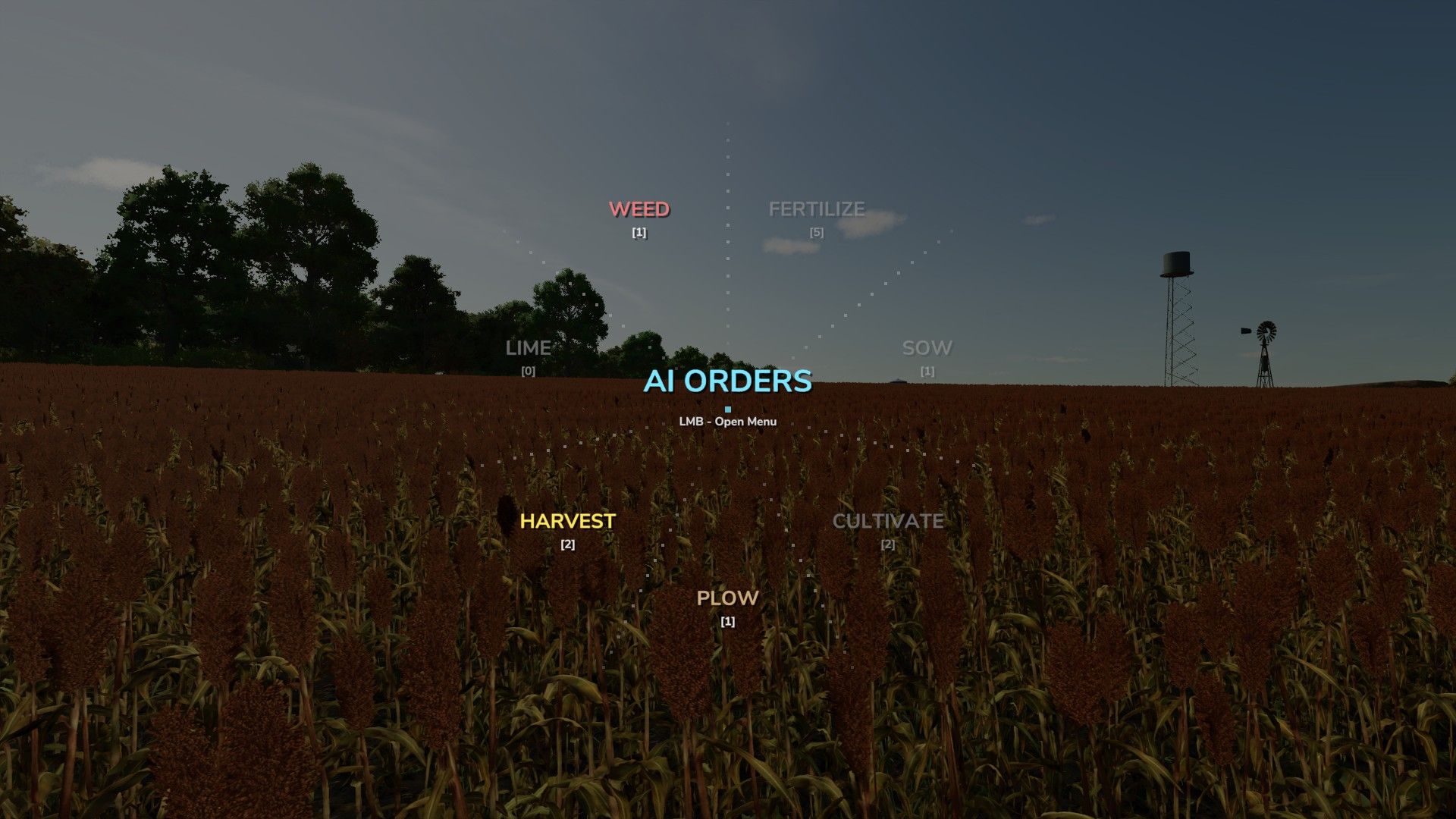
I'm coming back to you to understand what I'm doing wrong with your latest version which takes into account the AI menu (LSHIFT), I manage to access the AI menu, but the wheel remains greyed out!
I get a sound when I click and want to choose the AI to try to change the type of seedling ;) So I can't do it I took 2 screenshots, but I can't provide them here.
So I also tried to find your repository on github as it is done, but I couldn't find it (if you have a way about this ?). So for now, I have the captures on hand, if you have a solution.
I don't have any kind of error in the log, so I'm wondering if I'm the only one in this case, and if I'll have a mod conflict... I use AD and CP for info. I also take into account that the last version you made is a beta 1.1.0.0 so my doubts remain open.. I'll continue to invest in the issue with attempts at a single loaded mod and new savegame.
Thank you again for your magnificent work which is becoming mandatory for everyone who tastes it 🥲
@Ano I'm glad you figured it out. Just to clarify exactly how the smart field analysis works: you are partially right! The mod does have specific protections in place. For example, it blocks the 'Sow' category if the field is already sown, blocks 'Cultivate' on a sown field, and blocks 'Fertilize' if the field is already fully fertilized. However, it doesn't block absolutely everything — the 'Plow' category, for instance, is still available on a sown field, so you can still plow over it if needed. It's great to have players like you testing these mechanics so thoroughly.
Bonjour @DrivePro , It's sad to see that few people will see the help in the game you created for this purpose, anyway let's move on :/
I'm coming back to you to understand what I'm doing wrong with your latest version which takes into account the AI menu (LSHIFT), I manage to access the AI menu, but the wheel remains greyed out!
I get a sound when I click and want to choose the AI to try to change the type of seedling ;) So I can't do it I took 2 screenshots, but I can't provide them here.
So I also tried to find your repository on github as it is done, but I couldn't find it (if you have a way about this ?). So for now, I have the captures on hand, if you have a solution.
I don't have any kind of error in the log, so I'm wondering if I'm the only one in this case, and if I'll have a mod conflict... I use AD and CP for info. I also take into account that the last version you made is a beta 1.1.0.0 so my doubts remain open.. I'll continue to invest in the issue with attempts at a single loaded mod and new savegame.
Thank you again for your magnificent work which is becoming mandatory for everyone who tastes it 🥲
@Ano Hello. Thank you for taking the time to read the in-game manual and for your detailed feedback. The greyed-out AI menu you are seeing is actually the "Smart field analysis" feature working as intended. The mod automatically locks tasks if the current ground state does not match the attached implement. To have the menu highlight the categories, you need to stand on the field you plan to work on. The menu checks the field state itself: if it is fertilized <100%, the "FERTILIZE" category will light up, you can enter it, select a vehicle (you must remain standing on the field), and the vehicle will arrive and start working on its own.
To use the sowing command and change seeds, you must stand on the field, open the "SOW" category, hover over the equipment, and press "LSHIFT" or "Y" to change seeds. In the current version, you can only change seeds in the "SOW" category, but I already have a version in the works where you can also do this in the "CULTIVATE" category, because there are direct seeders in the game. If you are not testing this on a field, the options will be disabled.
Testing on a clean save without Courseplay and AutoDrive is a great idea to rule out any deep script conflicts. Since I do not use a public GitHub repository right now, you can join my Discord server to share your screenshots and report further findings. Thank you for testing the beta and for your support.
Discord: https://discord.gg/YqZ92FZn
Hello to you, thank you for this top mod, it's so practical and intuitive, fast to use, bug-free for me, I love perfections. Fluidity, fun, the wheel with tree structure should be native. Lively, sonorous, funny, really you have made a pearl from my point of view. The tree allows you to make categories, which (later) should allow you to expand awhole bunch of quick access in the game ex: animals, AI jobs, main respawns, heaps of ideas, but the real question is it necessary to do it really?
As it is, it's beautiful already, and knowing that it's also your very 1st mod leaves me on my butt... Congratulations again and thank you for existing to make us better gameplay <3
@Ano Hello! Thank you very much for the kind words. I am glad to hear that you find the mod intuitive and practical. Thank you again for your support!
@Seby Hello! Thank you for the feedback. What you described is not a bug, but the intended design. The mod intentionally emulates the standard vehicle switching action on a short press, while a long press opens the radial menu. Please note that by default on a controller, opening the radial menu is bound to holding RT + LT. To prevent conflicts, you absolutely must go into the game's control settings and completely UNBIND the default 'Switch to next vehicle' action. Once you remove the default bindings, both the short press emulation and the long press menu will work perfectly.

я только что обновил ваш скрипт, а как теперь работает он я задал таб не открывается меню
@artem roslav Отлично!

Sounds like a real good idea, but i really need to know, What vehicle has what implements attached at what fillstate.
@Fendtrian No need to worry! The smart filter is only for the second page of the radial menu. The first page with the main categories is completely untouched, so you can still check what implements are attached and monitor all fill states exactly like before.
@ilcusta Capito! Grazie per aver controllato. Sto lavorando all'aggiornamento proprio ora. Se decidi di condividere il tuo log.txt per aiutarmi a risolvere il problema più velocemente, non esitare a contattarmi su Discord: @drivepro.